Install ABConvert, create your first A/B test, and start reading results — all in under ten minutes.
This guide walks you through the fastest path to a running A/B test. By the end, you’ll have ABConvert installed, your tracking script active, and your first test collecting data.
1
Install ABConvert from the Shopify App Store
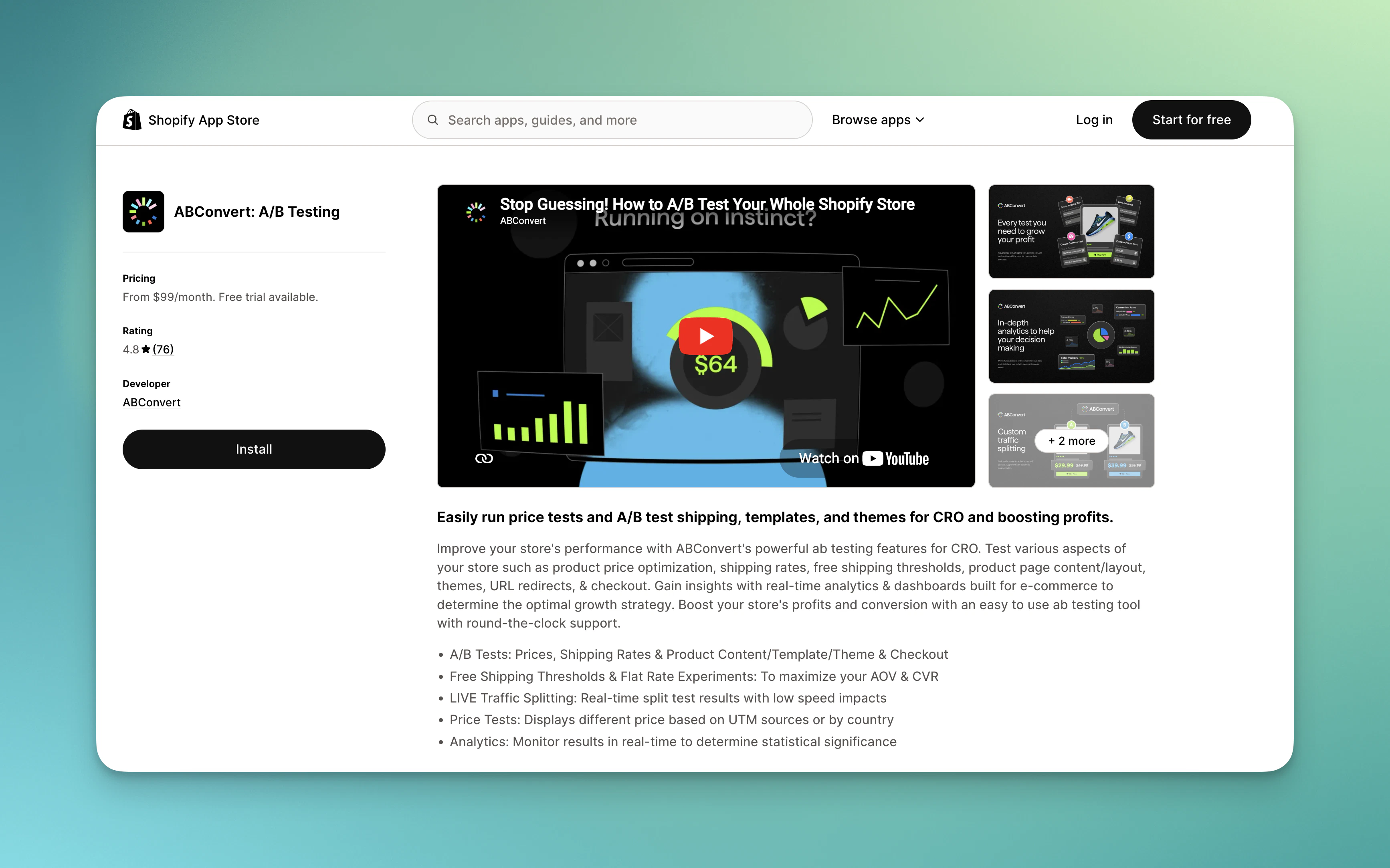
Open the ABConvert in Shopify App Store. Click Install, then review and accept the permissions ABConvert needs to run tests on your store.
Install ABConvert in Shopify app store
You’ll be redirected into the ABConvert dashboard inside your Shopify admin.
ABConvert requires access to your products, orders, and theme files to run tests. See Terms of service for a full list of what the app accesses and why.
2
Complete the onboarding survey
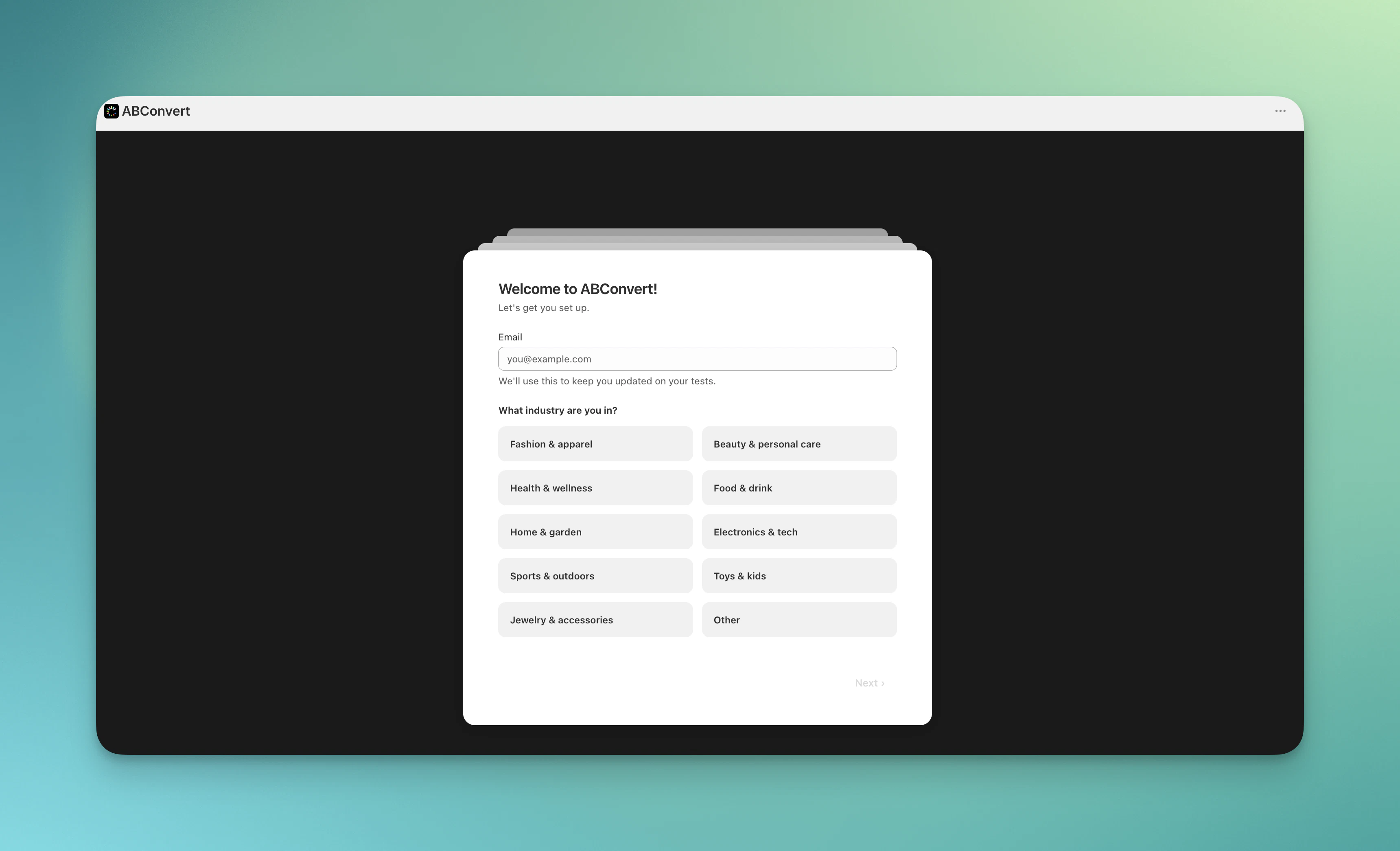
After installation, ABConvert walks you through a short onboarding survey. Your answers help ABConvert recommend the right test type for your store’s goals.
Complete onboarding survey
3
Create your first experiment
From the ABConvert dashboard, click Create test and choose a test type. If you’re unsure where to start:
Price test — if you want to find the optimal price for a product
Template test — if you want to find a best converting layout of product page
URL redirect test — if you want to compare two landing pages
Configure your test by selecting the products, templates, or pages you want to test, defining two or more test groups, and setting your traffic split (for example, 50/50). Give your test a name you’ll recognize in the Analytics dashboard, then click Launch test.Select a test type in overview for a step-by-step walkthrough of the specific test type.
4
Let data accumulate
Once your test is active, ABConvert starts tracking every visitor assigned to the test, recording views, add-to-carts, checkouts, and orders for each test group.
For statistically reliable results, run your test until it reaches statistical significance. ABConvert shows significance indicators in the analytics dashboard — avoid making decisions before your test reaches this threshold.
A typical test needs at least one to two weeks of data and a few hundred orders per variant to produce reliable conclusions. High-traffic stores may reach significance faster.
5
Review your results and act
Open Analytics from the dashboard sidebar to see full-funnel metrics for each variant: views, add-to-cart rate, checkout rate, conversion rate, and revenue per visitor.When you have a clear winner, click End test. ABConvert removes every test change from your store and preserves the result data. Apply the winning variant manually — for example, updating your product price or swapping in the winning image.
Where to go next
Price testing
Learn how to set up a price A/B test, including multi-market pricing.
Analytics overview
Understand the metrics ABConvert tracks and how to interpret your results.
⌘I
{"docsConfig":{"theme":"almond","$schema":"https://mintlify.com/docs.json","name":"ABConvert","colors":{"primary":"#82C621","light":"#ACFF17","dark":"#217BD1"},"logo":{"light":"https://mintcdn.com/abconvert/4yA52tsrkGprYEUg/images/ABConvert_docs_lightmode.svg?fit=max\u0026auto=format\u0026n=4yA52tsrkGprYEUg\u0026q=85\u0026s=4d993486a7a067b38b467aeffa07de01","dark":"https://mintcdn.com/abconvert/TfodKqLthDlOcMjW/images/ABConvert_docs_darkmode.svg?fit=max\u0026auto=format\u0026n=TfodKqLthDlOcMjW\u0026q=85\u0026s=40441b20987188f17066bbe227d4f4ca"},"favicon":"https://mintcdn.com/abconvert/f09IwWgWVmHpcZJi/images/favicon.svg?fit=max\u0026auto=format\u0026n=f09IwWgWVmHpcZJi\u0026q=85\u0026s=167ae8c0ca36d4d2c9a730a7f16c1fd4","navbar":{"primary":{"type":"github","href":"https://github.com/ABConvert"}},"styling":{"latex":false},"navigation":{"pages":[]}},"deployment":{"deploymentMetadataValue":{"subdomain":"abconvert","hasAudioNarration":false,"actualSubdomain":"abconvert","customDomains":["docs.abconvert.io"],"gitSource":{"type":"github","owner":"abconvert","repo":"ab-test-app","deployBranch":"main","contentDirectory":"external-docs","isPrivate":true,"mountPath":"","label":""},"entitlements":{"AI_CHAT":{"status":"DISABLED"},"WEB_MCP":{"status":"DISABLED"},"NARRATION":{"status":"DISABLED"}},"buildId":"6b007c2df9253d723a61b9e3","clientVersion":"0.0.4248","searchFilterCounts":[{"language":"default","tag":"Documentation","count":70},{"language":"default","tag":"REST API","count":21},{"language":"default","tag":"Integrations","count":16},{"language":"default","tag":"Experiments","count":16},{"language":"default","tag":"Headless SDK","count":16},{"language":"default","tag":"Analytics","count":12},{"language":"default","tag":"AI integration (MCP)","count":8},{"language":"default","tag":"Lifecycle","count":7},{"language":"default","tag":"JavaScript API","count":6},{"language":"default","tag":"Get Started","count":5}]},"assistantConfig":{"enableAskAiButton":false,"enableStarterQuestions":false,"enableContextualStarterQuestions":false,"enableAskAiSearchBar":true},"basePath":"","hasChatPermissions":false,"hasWebMcpPermissions":false,"toggles":[{"name":"kill-isr","enabled":true,"variant":{"name":"disabled","enabled":false,"feature_enabled":true},"impressionData":false},{"name":"custom-rbac-roles","enabled":true,"variant":{"name":"disabled","enabled":false,"feature_enabled":true},"impressionData":false},{"name":"agent-mintlify-slack","enabled":true,"variant":{"name":"disabled","enabled":false,"feature_enabled":true},"impressionData":false},{"name":"agent-integrations-settings","enabled":true,"variant":{"name":"disabled","enabled":false,"feature_enabled":true},"impressionData":false},{"name":"rbac-expansion","enabled":true,"variant":{"name":"disabled","enabled":false,"feature_enabled":true},"impressionData":false},{"name":"automations-pr-grouping","enabled":true,"variant":{"name":"disabled","enabled":false,"feature_enabled":true},"impressionData":false},{"name":"custom-prefix","enabled":true,"variant":{"name":"disabled","enabled":false,"feature_enabled":true},"impressionData":false},{"name":"analytics-v7","enabled":true,"variant":{"name":"disabled","enabled":false,"feature_enabled":true},"impressionData":false},{"name":"user-flows-analytics","enabled":true,"variant":{"name":"disabled","enabled":false,"feature_enabled":true},"impressionData":false},{"name":"no-publish-flow","enabled":true,"variant":{"name":"disabled","enabled":false,"feature_enabled":true},"impressionData":false},{"name":"workos-onboarding","enabled":true,"variant":{"name":"disabled","enabled":false,"feature_enabled":true},"impressionData":false},{"name":"snapshot-serving-live","enabled":true,"variant":{"name":"disabled","enabled":false,"feature_enabled":true},"impressionData":false},{"name":"stripTemperatureMiddleware","enabled":true,"variant":{"name":"disabled","enabled":false,"feature_enabled":true},"impressionData":false},{"name":"support-platform-pylon-zendesk","enabled":true,"variant":{"name":"disabled","enabled":false,"feature_enabled":true},"impressionData":false},{"name":"snapshot-serving","enabled":true,"variant":{"name":"disabled","enabled":false,"feature_enabled":true},"impressionData":false},{"name":"instant-rollback","enabled":true,"variant":{"name":"disabled","enabled":false,"feature_enabled":true},"impressionData":false},{"name":"granular-notifications-server","enabled":true,"variant":{"name":"disabled","enabled":false,"feature_enabled":true},"impressionData":false},{"name":"granular-notifications","enabled":true,"variant":{"name":"disabled","enabled":false,"feature_enabled":true},"impressionData":false},{"name":"automations-fable","enabled":true,"variant":{"name":"disabled","enabled":false,"feature_enabled":true},"impressionData":false},{"name":"fixed-ai-action-pricing","enabled":true,"variant":{"name":"disabled","enabled":false,"feature_enabled":true},"impressionData":false},{"name":"site-roles","enabled":true,"variant":{"name":"disabled","enabled":false,"feature_enabled":true},"impressionData":false},{"name":"automation-resolve-merge-conflict","enabled":true,"variant":{"name":"disabled","enabled":false,"feature_enabled":true},"impressionData":false},{"name":"scoped-publishing","enabled":true,"variant":{"name":"disabled","enabled":false,"feature_enabled":true},"impressionData":false},{"name":"mintql","enabled":true,"variant":{"name":"disabled","enabled":false,"feature_enabled":true},"impressionData":false},{"name":"page-level-analytics","enabled":true,"variant":{"name":"disabled","enabled":false,"feature_enabled":true},"impressionData":false},{"name":"editor-version-history-v2","enabled":true,"variant":{"name":"disabled","enabled":false,"feature_enabled":true},"impressionData":false},{"name":"billing-page-v2","enabled":true,"variant":{"name":"disabled","enabled":false,"feature_enabled":true},"impressionData":false},{"name":"full-page-search","enabled":true,"variant":{"name":"disabled","enabled":false,"feature_enabled":true},"impressionData":false},{"name":"workspace-projects","enabled":true,"variant":{"name":"disabled","enabled":false,"feature_enabled":true},"impressionData":false},{"name":"assistant-v5","enabled":true,"variant":{"name":"disabled","enabled":false,"feature_enabled":true},"impressionData":false},{"name":"fork-pr-previews","enabled":true,"variant":{"name":"disabled","enabled":false,"feature_enabled":true},"impressionData":false},{"name":"revalidation-jwt","enabled":true,"variant":{"name":"disabled","enabled":false,"feature_enabled":true},"impressionData":false},{"name":"workos-sso-scim","enabled":true,"variant":{"name":"disabled","enabled":false,"feature_enabled":true},"impressionData":false},{"name":"hobby-abuse-scan","enabled":true,"variant":{"name":"disabled","enabled":false,"feature_enabled":true},"impressionData":false},{"name":"dashboard-inbox","enabled":true,"variant":{"name":"disabled","enabled":false,"feature_enabled":true},"impressionData":false},{"name":"workos-signup","enabled":true,"variant":{"name":"disabled","enabled":false,"feature_enabled":true},"impressionData":false},{"name":"turbopuffer-dual-write","enabled":true,"variant":{"name":"disabled","enabled":false,"feature_enabled":true},"impressionData":false},{"name":"workos-enabled","enabled":true,"variant":{"name":"disabled","enabled":false,"feature_enabled":true},"impressionData":false},{"name":"approve-review-flow","enabled":true,"variant":{"name":"disabled","enabled":false,"feature_enabled":true},"impressionData":false},{"name":"editor-metadata","enabled":true,"variant":{"name":"disabled","enabled":false,"feature_enabled":true},"impressionData":false},{"name":"sso-setup-deadline-banner","enabled":true,"variant":{"name":"disabled","enabled":false,"feature_enabled":true},"impressionData":false},{"name":"turbopuffer-serve","enabled":true,"variant":{"name":"disabled","enabled":false,"feature_enabled":true},"impressionData":false},{"name":"live-agents","enabled":true,"variant":{"name":"disabled","enabled":false,"feature_enabled":true},"impressionData":false},{"name":"starter-pricing","enabled":true,"variant":{"name":"treatment","enabled":true,"payload":{"type":"string","value":"treatment"},"feature_enabled":true},"impressionData":false},{"name":"llms-txt-v2","enabled":true,"variant":{"name":"disabled","enabled":false,"feature_enabled":true},"impressionData":false},{"name":"wildcard-email-auth","enabled":true,"variant":{"name":"disabled","enabled":false,"feature_enabled":true},"impressionData":false}],"googleFontsInlined":true},"customCss":[{"filePath":"style.css","content":".nav-logo,.nav-logo img{height:40px!important;max-height:40px!important}html:not(.dark) svg[aria-roledescription=\"sequence\"] .note{fill:#eef8dc!important;stroke:#82c621!important}html:not(.dark) svg[aria-roledescription=\"sequence\"] .noteText,html:not(.dark) svg[aria-roledescription=\"sequence\"] .noteText>tspan{fill:#0f1a05!important}"}]}
{"page":{"pagePath":"quickstart","slug":"/quickstart","pageMetadata":{"title":"Get started with ABConvert in 10 minutes","sidebarTitle":"Quickstart","description":"Install ABConvert, create your first A/B test, and start reading results — all in under ten minutes.","href":"/quickstart"},"description":{"compiledSource":"\"use strict\";\nconst {jsx: _jsx} = arguments[0];\nconst {useMDXComponents: _provideComponents} = arguments[0];\nfunction _createMdxContent(props) {\n const _components = {\n p: \"p\",\n ..._provideComponents(),\n ...props.components\n };\n return _jsx(_components.p, {\n children: \"Install ABConvert, create your first A/B test, and start reading results — all in under ten minutes.\"\n });\n}\nfunction MDXContent(props = {}) {\n const {wrapper: MDXLayout} = {\n ..._provideComponents(),\n ...props.components\n };\n return MDXLayout ? _jsx(MDXLayout, {\n ...props,\n children: _jsx(_createMdxContent, {\n ...props\n })\n }) : _createMdxContent(props);\n}\nreturn {\n default: MDXContent\n};\n","frontmatter":{},"scope":{}},"pageType":"default","mdx":{"mdxSource":{"compiledSource":"\"use strict\";const{Fragment:_Fragment,jsx:_jsx,jsxs:_jsxs}=arguments[0];const{useMDXComponents:_provideComponents}=arguments[0];function _createMdxContent(props){const _components={a:`a`,li:`li`,p:`p`,strong:`strong`,ul:`ul`,..._provideComponents(),...props.components},{Card,CardGroup,Frame,Heading,Note,OptimizedImage,Step,Steps,Tip}=_components;if(!Card)_missingMdxReference(`Card`,true);if(!CardGroup)_missingMdxReference(`CardGroup`,true);if(!Frame)_missingMdxReference(`Frame`,true);if(!Heading)_missingMdxReference(`Heading`,true);if(!Note)_missingMdxReference(`Note`,true);if(!OptimizedImage)_missingMdxReference(`OptimizedImage`,true);if(!Step)_missingMdxReference(`Step`,true);if(!Steps)_missingMdxReference(`Steps`,true);if(!Tip)_missingMdxReference(`Tip`,true);return _jsxs(_Fragment,{children:[_jsx(_components.p,{children:`This guide walks you through the fastest path to a running A/B test. By the end, you’ll have ABConvert installed, your tracking script active, and your first test collecting data.`}),`\n`,_jsxs(Steps,{children:[_jsxs(Step,{title:`Install ABConvert from the Shopify App Store`,children:[_jsxs(_components.p,{children:[`Open the `,_jsx(_components.a,{href:`https://apps.shopify.com/a-b-convert-price-a-b-test`,children:`ABConvert in Shopify App Store`}),`. Click `,_jsx(_components.strong,{children:`Install`}),`, then review and accept the permissions ABConvert needs to run tests on your store.`]}),_jsx(Frame,{caption:`Install ABConvert in Shopify app store`,children:_jsx(OptimizedImage,{src:`https://mintcdn.com/abconvert/hgulbOxonMZYKclB/images/get-started/app-store.png?fit=max\u0026auto=format\u0026n=hgulbOxonMZYKclB\u0026q=85\u0026s=3fd53f080685b16ffda272becf3b67b0`,alt:`Install`,\"data-og-width\":`3468`,width:`3468`,\"data-og-height\":`2166`,height:`2166`,\"data-path\":`images/get-started/app-store.png`,\"data-optimize\":`true`,\"data-opv\":`3`,srcset:`https://mintcdn.com/abconvert/hgulbOxonMZYKclB/images/get-started/app-store.png?w=280\u0026fit=max\u0026auto=format\u0026n=hgulbOxonMZYKclB\u0026q=85\u0026s=f317672e0c51715772fb769b8e66f256 280w, https://mintcdn.com/abconvert/hgulbOxonMZYKclB/images/get-started/app-store.png?w=560\u0026fit=max\u0026auto=format\u0026n=hgulbOxonMZYKclB\u0026q=85\u0026s=6798e87b07ee93e3aa61b1d1393943f5 560w, https://mintcdn.com/abconvert/hgulbOxonMZYKclB/images/get-started/app-store.png?w=840\u0026fit=max\u0026auto=format\u0026n=hgulbOxonMZYKclB\u0026q=85\u0026s=ef3edab7cfc601a4293b1e03a4483af7 840w, https://mintcdn.com/abconvert/hgulbOxonMZYKclB/images/get-started/app-store.png?w=1100\u0026fit=max\u0026auto=format\u0026n=hgulbOxonMZYKclB\u0026q=85\u0026s=dc21b6d0d6a0644b64168b49e5de2b80 1100w, https://mintcdn.com/abconvert/hgulbOxonMZYKclB/images/get-started/app-store.png?w=1650\u0026fit=max\u0026auto=format\u0026n=hgulbOxonMZYKclB\u0026q=85\u0026s=77892ea3e66c56b484674827f88d9442 1650w, https://mintcdn.com/abconvert/hgulbOxonMZYKclB/images/get-started/app-store.png?w=2500\u0026fit=max\u0026auto=format\u0026n=hgulbOxonMZYKclB\u0026q=85\u0026s=9dfb37e39421fdd61b84f6e4d7d4ce04 2500w`})}),_jsx(_components.p,{children:`You’ll be redirected into the ABConvert dashboard inside your Shopify admin.`}),_jsx(Note,{children:_jsxs(_components.p,{children:[`ABConvert requires access to your products, orders, and theme files to run tests. See `,_jsx(_components.a,{href:`https://www.abconvert.io/terms-of-service`,children:`Terms of service`}),` for a full list of what the app accesses and why.`]})})]}),_jsxs(Step,{title:`Complete the onboarding survey`,children:[_jsx(_components.p,{children:`After installation, ABConvert walks you through a short onboarding survey. Your answers help ABConvert recommend the right test type for your store’s goals.`}),_jsx(Frame,{caption:`Complete onboarding survey`,children:_jsx(OptimizedImage,{src:`https://mintcdn.com/abconvert/hgulbOxonMZYKclB/images/get-started/onboarding.png?fit=max\u0026auto=format\u0026n=hgulbOxonMZYKclB\u0026q=85\u0026s=05087602cdbdcae5cbfd392a3ab6ffac`,alt:`Onboarding survey`,\"data-og-width\":`3440`,width:`3440`,\"data-og-height\":`2090`,height:`2090`,\"data-path\":`images/get-started/onboarding.png`,\"data-optimize\":`true`,\"data-opv\":`3`,srcset:`https://mintcdn.com/abconvert/hgulbOxonMZYKclB/images/get-started/onboarding.png?w=280\u0026fit=max\u0026auto=format\u0026n=hgulbOxonMZYKclB\u0026q=85\u0026s=336f4681b5bebeb02ee28ff1577e35f6 280w, https://mintcdn.com/abconvert/hgulbOxonMZYKclB/images/get-started/onboarding.png?w=560\u0026fit=max\u0026auto=format\u0026n=hgulbOxonMZYKclB\u0026q=85\u0026s=1ae70e50fc3898c31bc363c06d6a32ea 560w, https://mintcdn.com/abconvert/hgulbOxonMZYKclB/images/get-started/onboarding.png?w=840\u0026fit=max\u0026auto=format\u0026n=hgulbOxonMZYKclB\u0026q=85\u0026s=5569bd2aa8bcfd0d1254a06445728333 840w, https://mintcdn.com/abconvert/hgulbOxonMZYKclB/images/get-started/onboarding.png?w=1100\u0026fit=max\u0026auto=format\u0026n=hgulbOxonMZYKclB\u0026q=85\u0026s=4147ff9033f5f95ed6e3412310ce7508 1100w, https://mintcdn.com/abconvert/hgulbOxonMZYKclB/images/get-started/onboarding.png?w=1650\u0026fit=max\u0026auto=format\u0026n=hgulbOxonMZYKclB\u0026q=85\u0026s=a2551a56df537f86529a5ee4535b4a44 1650w, https://mintcdn.com/abconvert/hgulbOxonMZYKclB/images/get-started/onboarding.png?w=2500\u0026fit=max\u0026auto=format\u0026n=hgulbOxonMZYKclB\u0026q=85\u0026s=0864760373609658e6cbbb18a1886693 2500w`})})]}),_jsxs(Step,{title:`Create your first experiment`,children:[_jsxs(_components.p,{children:[`From the ABConvert dashboard, click `,_jsx(_components.strong,{children:`Create test`}),` and choose a test type. If you’re unsure where to start:`]}),_jsxs(_components.ul,{children:[`\n`,_jsxs(_components.li,{children:[_jsx(_components.strong,{children:`Price test`}),` — if you want to find the optimal price for a product`]}),`\n`,_jsxs(_components.li,{children:[_jsx(_components.strong,{children:`Template test`}),` — if you want to find a best converting layout of product page`]}),`\n`,_jsxs(_components.li,{children:[_jsx(_components.strong,{children:`URL redirect test`}),` — if you want to compare two landing pages`]}),`\n`]}),_jsxs(_components.p,{children:[`Configure your test by selecting the products, templates, or pages you want to test, defining two or more test groups, and setting your traffic split (for example, 50/50). Give your test a name you’ll recognize in the Analytics dashboard, then click `,_jsx(_components.strong,{children:`Launch test`}),`.`]}),_jsxs(_components.p,{children:[`Select a test type in `,_jsx(_components.a,{href:`/experiments/overview`,children:`overview`}),` for a step-by-step walkthrough of the specific test type.`]})]}),_jsxs(Step,{title:`Let data accumulate`,children:[_jsx(_components.p,{children:`Once your test is active, ABConvert starts tracking every visitor assigned to the test, recording views, add-to-carts, checkouts, and orders for each test group.`}),_jsx(Tip,{children:_jsx(_components.p,{children:`For statistically reliable results, run your test until it reaches statistical significance. ABConvert shows significance indicators in the analytics dashboard — avoid making decisions before your test reaches this threshold.`})}),_jsx(_components.p,{children:`A typical test needs at least one to two weeks of data and a few hundred orders per variant to produce reliable conclusions. High-traffic stores may reach significance faster.`})]}),_jsxs(Step,{title:`Review your results and act`,children:[_jsxs(_components.p,{children:[`Open `,_jsx(_components.a,{href:`/analytics/overview`,children:`Analytics`}),` from the dashboard sidebar to see full-funnel metrics for each variant: views, add-to-cart rate, checkout rate, conversion rate, and revenue per visitor.`]}),_jsxs(_components.p,{children:[`When you have a clear winner, click `,_jsx(_components.strong,{children:`End test`}),`. ABConvert removes every test change from your store and preserves the result data. Apply the winning variant manually — for example, updating your product price or swapping in the winning image.`]})]})]}),`\n`,_jsx(Heading,{level:`2`,id:`where-to-go-next`,children:`Where to go next`}),`\n`,_jsxs(CardGroup,{cols:2,children:[_jsx(Card,{title:`Price testing`,icon:`tag`,href:`/experiments/price-test`,children:_jsx(_components.p,{children:`Learn how to set up a price A/B test, including multi-market pricing.`})}),_jsx(Card,{title:`Analytics overview`,icon:`chart-line`,href:`/analytics/overview`,children:_jsx(_components.p,{children:`Understand the metrics ABConvert tracks and how to interpret your results.`})})]})]})}function MDXContent(props={}){const{wrapper:MDXLayout}={..._provideComponents(),...props.components};return MDXLayout?_jsx(MDXLayout,{...props,children:_jsx(_createMdxContent,{...props})}):_createMdxContent(props)}return{default:MDXContent};function _missingMdxReference(id,component){throw new Error(`Expected `+(component?`component`:`object`)+\" `\"+id+\"` to be defined: you likely forgot to import, pass, or provide it.\")}","frontmatter":{},"scope":{"config":{},"pageMetadata":{"title":"Get started with ABConvert in 10 minutes","sidebarTitle":"Quickstart","description":"Install ABConvert, create your first A/B test, and start reading results — all in under ten minutes.","href":"/quickstart"}}},"mdxSourceWithNoJs":null},"mdxExtracts":{"tableOfContents":[{"title":"Where to go next","slug":"where-to-go-next","depth":2,"children":[]}],"codeExamples":{}},"jsLinks":[],"subdomain":"abconvert","siteName":"ABConvert","title":"Get started with ABConvert in 10 minutes - ABConvert","navMaps":{"firstHrefInVersion":{},"firstHrefInLanguage":{}},"lastModified":"2026-09-09T09:56:31.464Z","originalFileLocation":"quickstart.mdx"},"headHtml":"\u003cscript data-mint-head>(function(){var d=document.documentElement,p=null;if(!p){try{p=localStorage.getItem(\"isDarkMode\")}catch(e){}if(p==='true')p='dark';else if(p==='false')p='light';if(p!=='light'\u0026\u0026p!=='dark'\u0026\u0026p!=='system')p=\"system\"}var r=p==='system'?(matchMedia(\"(prefers-color-scheme: dark)\").matches?'dark':'light'):p;d.classList.remove(r==='dark'?'light':'dark');d.classList.add(r);d.setAttribute(\"data-theme-preference\",p)})();\u003c/script>\u003cmeta data-mint-head name=\"description\" content=\"Install ABConvert, create your first A/B test, and start reading results — all in under ten minutes.\">\u003cmeta data-mint-head name=\"application-name\" content=\"ABConvert\">\u003cmeta data-mint-head name=\"generator\" content=\"Mintlify\">\u003clink data-mint-head rel=\"icon\" type=\"image/png\" sizes=\"192x192\" href=\"/mintlify-assets/_mintlify/favicons/abconvert/cj-fLemAa7_6ImHd/_generated/favicon/android-chrome-192x192.png\" media=\"(prefers-color-scheme: light)\">\u003clink data-mint-head rel=\"apple-touch-icon\" type=\"image/png\" sizes=\"180x180\" href=\"/mintlify-assets/_mintlify/favicons/abconvert/cj-fLemAa7_6ImHd/_generated/favicon/apple-touch-icon.png\">\u003clink data-mint-head rel=\"icon\" type=\"image/png\" sizes=\"16x16\" href=\"/mintlify-assets/_mintlify/favicons/abconvert/cj-fLemAa7_6ImHd/_generated/favicon/favicon-16x16.png\" media=\"(prefers-color-scheme: light)\">\u003clink data-mint-head rel=\"icon\" type=\"image/png\" sizes=\"32x32\" href=\"/mintlify-assets/_mintlify/favicons/abconvert/cj-fLemAa7_6ImHd/_generated/favicon/favicon-32x32.png\" media=\"(prefers-color-scheme: light)\">\u003clink data-mint-head rel=\"shortcut icon\" type=\"image/x-icon\" href=\"/mintlify-assets/_mintlify/favicons/abconvert/cj-fLemAa7_6ImHd/_generated/favicon/favicon.ico\" media=\"(prefers-color-scheme: light)\">\u003clink data-mint-head rel=\"icon\" type=\"image/png\" sizes=\"192x192\" href=\"/mintlify-assets/_mintlify/favicons/abconvert/cj-fLemAa7_6ImHd/_generated/favicon-dark/android-chrome-192x192.png\" media=\"(prefers-color-scheme: dark)\">\u003clink data-mint-head rel=\"icon\" type=\"image/png\" sizes=\"16x16\" href=\"/mintlify-assets/_mintlify/favicons/abconvert/cj-fLemAa7_6ImHd/_generated/favicon-dark/favicon-16x16.png\" media=\"(prefers-color-scheme: dark)\">\u003clink data-mint-head rel=\"icon\" type=\"image/png\" sizes=\"32x32\" href=\"/mintlify-assets/_mintlify/favicons/abconvert/cj-fLemAa7_6ImHd/_generated/favicon-dark/favicon-32x32.png\" media=\"(prefers-color-scheme: dark)\">\u003clink data-mint-head rel=\"shortcut icon\" type=\"image/x-icon\" href=\"/mintlify-assets/_mintlify/favicons/abconvert/cj-fLemAa7_6ImHd/_generated/favicon-dark/favicon.ico\" media=\"(prefers-color-scheme: dark)\">\u003cmeta data-mint-head property=\"og:title\" content=\"Get started with ABConvert in 10 minutes - ABConvert\">\u003cmeta data-mint-head property=\"og:description\" content=\"Install ABConvert, create your first A/B test, and start reading results — all in under ten minutes.\">\u003cmeta data-mint-head property=\"og:site_name\" content=\"ABConvert\">\u003cmeta data-mint-head property=\"og:url\" content=\"https://docs.abconvert.io/quickstart\">\u003cmeta data-mint-head property=\"og:type\" content=\"website\">\u003cmeta data-mint-head property=\"og:image\" content=\"https://abconvert.mintlify.site/_mintlify/api/og/v2?division=Documentation\u0026amp;title=Get+started+with+ABConvert+in+10+minutes\u0026amp;description=Install+ABConvert%2C+create+your+first+A%2FB+test%2C+and+start+reading+results+%E2%80%94+all+in+under+ten+minutes.\u0026amp;theme=1e130442590a82eb3470e138\u0026amp;signature=134b0aee145f30bf125af25abe6ff96bd08d76f2d416d7dd85dcc743c4415836\">\u003cmeta data-mint-head property=\"og:image:width\" content=\"1200\">\u003cmeta data-mint-head property=\"og:image:height\" content=\"630\">\u003cmeta data-mint-head name=\"twitter:card\" content=\"summary_large_image\">\u003cmeta data-mint-head name=\"twitter:title\" content=\"Get started with ABConvert in 10 minutes - ABConvert\">\u003cmeta data-mint-head name=\"twitter:description\" content=\"Install ABConvert, create your first A/B test, and start reading results — all in under ten minutes.\">\u003cmeta data-mint-head name=\"twitter:image\" content=\"https://abconvert.mintlify.site/_mintlify/api/og/v2?division=Documentation\u0026amp;title=Get+started+with+ABConvert+in+10+minutes\u0026amp;description=Install+ABConvert%2C+create+your+first+A%2FB+test%2C+and+start+reading+results+%E2%80%94+all+in+under+ten+minutes.\u0026amp;theme=1e130442590a82eb3470e138\u0026amp;signature=134b0aee145f30bf125af25abe6ff96bd08d76f2d416d7dd85dcc743c4415836\">\u003cmeta data-mint-head name=\"twitter:image:width\" content=\"1200\">\u003cmeta data-mint-head name=\"twitter:image:height\" content=\"630\">\u003cmeta data-mint-head name=\"msapplication-config\" content=\"/mintlify-assets/_mintlify/favicons/abconvert/cj-fLemAa7_6ImHd/_generated/favicon/browserconfig.xml\">\u003cmeta data-mint-head name=\"apple-mobile-web-app-title\" content=\"ABConvert\">\u003cmeta data-mint-head name=\"msapplication-TileColor\" content=\"#82C621\">\u003clink data-mint-head rel=\"canonical\" href=\"https://docs.abconvert.io/quickstart\">\u003clink data-mint-head rel=\"alternate\" type=\"application/xml\" href=\"/sitemap.xml\">\u003clink data-mint-head rel=\"alternate\" type=\"text/markdown\" href=\"/quickstart.md\">\u003cscript data-mint-head type=\"application/ld+json\">{\"@context\":\"https://schema.org\",\"@type\":\"WebSite\",\"name\":\"ABConvert\",\"publisher\":{\"@type\":\"Organization\",\"name\":\"ABConvert\"},\"provider\":{\"@type\":\"Organization\",\"name\":\"Mintlify\",\"url\":\"https://mintlify.com\"}}\u003c/script>","agentPointerHref":"/quickstart.md","siteName":"ABConvert","nav":{"global":null,"tabs":[{"tab":"Documentation","groups":[{"group":"Get Started","pages":[{"title":"ABConvert: Shopify A/B Testing Built for Revenue Growth","sidebarTitle":"Introduction","href":"/introduction"},{"title":"Onboarding ABConvert","sidebarTitle":"Onboarding","href":"/onboarding"},{"title":"Idea Bank","href":"/idea-bank"},{"title":"Pricing Plans","sidebarTitle":"Pricing Plans","href":"/pricing-plans"},{"title":"Billing and Overage","sidebarTitle":"Billing and Overage","href":"/billing-and-overage"}]},{"group":"Experiments","pages":[{"title":"Overview","sidebarTitle":"Overview","href":"/experiments/overview"},{"title":"Test lifecycle","sidebarTitle":"Lifecycle","href":"/experiments/lifecycle"},{"title":"Schedule a test","sidebarTitle":"Schedule","href":"/experiments/schedule"},{"title":"Price Test: Getting Started","sidebarTitle":"Price Test","href":"/experiments/price-test"},{"title":"Shipping Test: Getting Started","sidebarTitle":"Shipping Test","href":"/experiments/shipping-test"},{"title":"Offer Test: Getting Started","sidebarTitle":"Offer Test","href":"/experiments/offer-test"},{"title":"URL Redirect Test: Getting Started","sidebarTitle":"URL Redirect Test","href":"/experiments/url-redirect-test"},{"title":"Template Test: Getting Started","sidebarTitle":"Template Test","href":"/experiments/template-test"},{"title":"Theme Test: Getting Started","sidebarTitle":"Theme Test","href":"/experiments/theme-test"},{"group":"Visual Editor Test","pages":[{"title":"Visual Editor Test: Getting Started","sidebarTitle":"Getting Started","href":"/experiments/visual-editor-test"},{"title":"Store Editor","sidebarTitle":"Store Editor","href":"/experiments/visual-editor"},{"title":"In-App Editor","sidebarTitle":"In-App Editor","href":"/experiments/in-app-editor"}]},{"title":"Checkout test","sidebarTitle":"Checkout test","href":"/experiments/checkout-test"},{"title":"Subscription test","sidebarTitle":"Subscription test","href":"/experiments/subscription-test"},{"title":"Combined Test: Getting Started","sidebarTitle":"Combined Test","href":"/experiments/combined-test"},{"title":"Custom Code","sidebarTitle":"Custom Code","href":"/experiments/custom-code"}]},{"group":"Targeting","pages":[{"title":"Overview","sidebarTitle":"Overview","href":"/targeting/overview"},{"title":"Audience Targeting","sidebarTitle":"Audience Targeting","href":"/targeting/audience-targeting"},{"title":"Custom JavaScript","sidebarTitle":"Custom JavaScript","tag":"Beta","href":"/targeting/custom-javascript"},{"title":"Page Targeting","sidebarTitle":"Page Targeting","tag":"Beta","href":"/targeting/page-targeting"}]},{"group":"Personalization","pages":[{"title":"Personalization","sidebarTitle":"Overview","href":"/personalization/overview"}]},{"group":"Analytics","pages":[{"title":"Analytics overview: Understand your A/B test results","sidebarTitle":"Analytics Overview","href":"/analytics/overview"},{"title":"How to Interpret Analytics Results and Choose a Next Action","sidebarTitle":"Interpret Results","href":"/analytics/interpret-results"},{"title":"Make a Decision on a Low-Traffic Test","sidebarTitle":"Low-Traffic Decisions","href":"/analytics/low-traffic-decisions"},{"title":"Statistical Significance in A/B Testing Explained","sidebarTitle":"Statistical Significance","href":"/analytics/statistical-significance"},{"title":"Analytics Metrics: How ABConvert Groups and Calculates Them","sidebarTitle":"Metrics","href":"/analytics/metrics"},{"title":"Set up custom events","sidebarTitle":"Custom events","href":"/analytics/custom-events"},{"title":"Traffic and Conversion Metrics","sidebarTitle":"Traffic \u0026 Conversion","href":"/analytics/metrics-traffic-conversion"},{"title":"Revenue and Profit Metrics","sidebarTitle":"Revenue \u0026 Profit","href":"/analytics/metrics-revenue-profit"},{"title":"Discount Metrics","sidebarTitle":"Discount","href":"/analytics/metrics-discount"},{"title":"Use custom events in Analytics","sidebarTitle":"Custom event results","href":"/analytics/custom-event-results"},{"title":"Engagement Metrics: Measure How a Variant Affects a Page","sidebarTitle":"Engagement","href":"/analytics/engagement-metrics"},{"title":"Product Groups: Analyze Test Results by Product","sidebarTitle":"Product Groups","href":"/analytics/product-groups"}]},{"group":"Configuration","pages":[{"title":"App Settings: Configure ABConvert for Your Store","sidebarTitle":"App Settings","href":"/configuration/settings"}]},{"group":"Integrations","pages":[{"title":"Integrations","sidebarTitle":"Overview","href":"/integrations/overview"},{"title":"Microsoft Clarity Integration","sidebarTitle":"Clarity","href":"/integrations/clarity"},{"title":"Hotjar Integration","sidebarTitle":"Hotjar","href":"/integrations/hotjar"},{"title":"Contentsquare Integration","sidebarTitle":"Contentsquare","href":"/integrations/contentsquare"},{"title":"Heatmap Integration: Filter Heatmaps and Recordings by Test Group","sidebarTitle":"Heatmap","href":"/integrations/heatmap"},{"title":"Heap integration","sidebarTitle":"Heap","href":"/integrations/heap"},{"title":"Amplitude Integration","sidebarTitle":"Amplitude","href":"/integrations/amplitude"},{"title":"Mixpanel Integration","sidebarTitle":"Mixpanel","href":"/integrations/mixpanel"},{"title":"Segment Integration: Send Test Assignments to Segment","sidebarTitle":"Segment","href":"/integrations/segment"},{"title":"Klaviyo Integration: Test Groups in Klaviyo and Segments as Audiences","sidebarTitle":"Klaviyo","href":"/integrations/klaviyo"},{"title":"BigQuery Export","sidebarTitle":"BigQuery","href":"/integrations/bigquery"},{"title":"Recharge integration","sidebarTitle":"Recharge","href":"/integrations/recharge"},{"title":"Stay.AI integration","sidebarTitle":"Stay.AI","href":"/integrations/stay"},{"title":"SKIO integration","sidebarTitle":"SKIO","href":"/integrations/skio"},{"title":"Third-party analytics integrations","sidebarTitle":"Analytics integrations","href":"/configuration/third-party-analytics"},{"title":"GA4 Integration: Track Tests in Google Analytics","sidebarTitle":"GA4 Integration","href":"/configuration/ga4-integration"}]},{"group":"Shopify Sidekick","tag":"Beta","pages":[{"title":"Shopify Sidekick data extension","sidebarTitle":"Data extension","tag":"Beta","href":"/sidekick/data-extension"}]},{"group":"AI integration (MCP)","tag":"Beta","pages":[{"title":"Use ABConvert from your AI assistant","sidebarTitle":"Overview","href":"/mcp/overview"},{"title":"Connect ChatGPT or Claude to ABConvert","sidebarTitle":"Quickstart","href":"/mcp/quickstart"},{"title":"Connect ABConvert to ChatGPT","sidebarTitle":"ChatGPT","href":"/mcp/chatgpt-connector"},{"title":"Connect ABConvert to Claude","sidebarTitle":"Claude","href":"/mcp/claude-connector"},{"title":"Connect coding agents and other MCP clients","sidebarTitle":"Other clients","href":"/mcp/other-clients"},{"title":"What you can ask your assistant","sidebarTitle":"Available tools","href":"/mcp/tools"},{"title":"MCP troubleshooting","sidebarTitle":"Troubleshooting","href":"/mcp/troubleshooting"},{"title":"Security \u0026 token management","sidebarTitle":"Security","href":"/mcp/security"}]},{"group":"Help","pages":[{"title":"Subscription test tutorial","sidebarTitle":"Subscription test tutorial","href":"/help/subscription-test-tutorial"},{"title":"Troubleshooting Common ABConvert Issues","sidebarTitle":"Troubleshooting","href":"/help/troubleshooting"},{"title":"Refund and Cancellation Policy","sidebarTitle":"Refund policy","href":"/help/refund-policy"},{"title":"Data and Privacy: How ABConvert Handles Your Shoppers' Data","sidebarTitle":"Data and privacy","href":"/help/data-and-privacy"},{"title":"Frequently Asked Questions — ABConvert","sidebarTitle":"FAQ","href":"/help/faq"}]},{"group":"Changelog","pages":[{"title":"Changelog","href":"/changelog/overview"}]}]},{"tab":"REST API","groups":[{"group":"Overview","tag":"Beta","pages":[{"title":"API overview","sidebarTitle":"Overview","href":"/api-reference/overview"},{"title":"Authentication","sidebarTitle":"Authentication","href":"/api-reference/authentication"}]},{"group":"Tests","tag":"Beta","pages":[{"title":"List tests","deprecated":null,"version":null,"openapi":"/api-reference/openapi.yaml get /experiments","href":"/api-reference/experiments/list-tests"},{"title":"Create a test","deprecated":null,"version":null,"openapi":"/api-reference/openapi.yaml post /experiments","href":"/api-reference/experiments/create-a-test"},{"title":"Retrieve a test","deprecated":null,"version":null,"openapi":"/api-reference/openapi.yaml get /experiments/{id}","href":"/api-reference/experiments/retrieve-a-test"},{"title":"Update a test","deprecated":null,"version":null,"openapi":"/api-reference/openapi.yaml patch /experiments/{id}","href":"/api-reference/experiments/update-a-test"}]},{"group":"Lifecycle","tag":"Beta","pages":[{"title":"Launch a test","deprecated":null,"version":null,"openapi":"/api-reference/openapi.yaml post /experiments/{id}/start","href":"/api-reference/lifecycle/launch-a-test"},{"title":"Preview a test","deprecated":null,"version":null,"openapi":"/api-reference/openapi.yaml post /experiments/{id}/preview","href":"/api-reference/lifecycle/preview-a-test"},{"title":"Convert a test to draft","deprecated":null,"version":null,"openapi":"/api-reference/openapi.yaml post /experiments/{id}/revert_to_draft","href":"/api-reference/lifecycle/convert-a-test-to-draft"},{"title":"Pause a test","deprecated":null,"version":null,"openapi":"/api-reference/openapi.yaml post /experiments/{id}/pause","href":"/api-reference/lifecycle/pause-a-test"},{"title":"Resume a test","deprecated":null,"version":null,"openapi":"/api-reference/openapi.yaml post /experiments/{id}/resume","href":"/api-reference/lifecycle/resume-a-test"},{"title":"End a test","deprecated":null,"version":null,"openapi":"/api-reference/openapi.yaml post /experiments/{id}/end","href":"/api-reference/lifecycle/end-a-test"},{"title":"Archive a test","deprecated":null,"version":null,"openapi":"/api-reference/openapi.yaml post /experiments/{id}/archive","href":"/api-reference/lifecycle/archive-a-test"}]},{"group":"Schedule","tag":"Beta","pages":[{"title":"Set the schedule window","deprecated":null,"version":null,"openapi":"/api-reference/openapi.yaml put /experiments/{id}/schedule","href":"/api-reference/experiments/set-the-schedule-window"},{"title":"Clear the schedule window","deprecated":null,"version":null,"openapi":"/api-reference/openapi.yaml delete /experiments/{id}/schedule","href":"/api-reference/experiments/clear-the-schedule-window"}]},{"group":"Results","tag":"Beta","pages":[{"title":"Retrieve the results snapshot","deprecated":null,"version":null,"openapi":"/api-reference/openapi.yaml get /experiments/{id}/results","href":"/api-reference/results/retrieve-the-results-snapshot"},{"title":"Create a custom result query","deprecated":null,"version":null,"openapi":"/api-reference/openapi.yaml post /experiments/{id}/results","href":"/api-reference/results/create-a-custom-result-query"},{"title":"Retrieve a custom result query","deprecated":null,"version":null,"openapi":"/api-reference/openapi.yaml get /experiments/{id}/results/{query_id}","href":"/api-reference/results/retrieve-a-custom-result-query"}]},{"group":"Exports","tag":"Beta","pages":[{"title":"Create an export job","deprecated":null,"version":null,"openapi":"/api-reference/openapi.yaml post /experiments/{id}/exports","href":"/api-reference/exports/create-an-export-job"},{"title":"Retrieve an export job","deprecated":null,"version":null,"openapi":"/api-reference/openapi.yaml get /exports/{id}","href":"/api-reference/exports/retrieve-an-export-job"},{"title":"Download an export file","deprecated":null,"version":null,"openapi":"/api-reference/openapi.yaml get /exports/{id}/download","href":"/api-reference/exports/download-an-export-file"}]}]},{"tab":"JavaScript API","groups":[{"group":"JavaScript API","pages":[{"title":"JavaScript API","sidebarTitle":"Overview","href":"/api-reference/browser-api"},{"title":"JavaScript API examples","sidebarTitle":"Examples","href":"/api-reference/browser-api-examples"},{"title":"JavaScript API reference","sidebarTitle":"Reference","href":"/api-reference/browser-api-reference"}]}]},{"tab":"Headless SDK","groups":[{"group":"Get started","pages":[{"title":"Headless SDK","sidebarTitle":"Overview","href":"/headless-sdk/overview"},{"title":"Headless SDK on Next.js","sidebarTitle":"Next.js","href":"/headless-sdk/nextjs"},{"title":"Headless SDK on Hydrogen","sidebarTitle":"Hydrogen","href":"/headless-sdk/hydrogen"},{"title":"Headless SDK on other stacks","sidebarTitle":"Other stacks","href":"/headless-sdk/other-stacks"}]},{"group":"Build","pages":[{"title":"Show test prices, shipping rates, and offers","sidebarTitle":"Prices, shipping, and offers","href":"/headless-sdk/prices"},{"title":"Connect the cart and checkout","sidebarTitle":"Cart and checkout","href":"/headless-sdk/cart"},{"title":"URL redirect tests on a custom storefront","sidebarTitle":"URL redirect tests","href":"/headless-sdk/url-redirects"},{"title":"Read the visitor's test group","sidebarTitle":"Test groups","href":"/headless-sdk/test-groups"},{"title":"Feature tests","sidebarTitle":"Feature tests","tag":"Coming soon","href":"/headless-sdk/feature-tests"}]},{"group":"Configure","pages":[{"title":"Targeting on a custom storefront","sidebarTitle":"Targeting","href":"/headless-sdk/targeting"},{"title":"Tracking and cookies","sidebarTitle":"Tracking and cookies","href":"/headless-sdk/tracking"},{"title":"Preview and check your integration","sidebarTitle":"Preview and check","href":"/headless-sdk/preview"},{"title":"Loading and failures","sidebarTitle":"Loading and failures","href":"/headless-sdk/loading"}]},{"group":"Advanced","pages":[{"title":"Next.js caching and CDN","sidebarTitle":"Next.js caching and CDN","href":"/headless-sdk/nextjs-caching"},{"title":"Hydrogen full-page cache","sidebarTitle":"Hydrogen full-page cache","href":"/headless-sdk/hydrogen-caching"}]},{"group":"Reference","pages":[{"title":"Headless SDK reference","sidebarTitle":"Reference","href":"/headless-sdk/reference"}]}]}]},"basePath":"","title":"Get started with ABConvert in 10 minutes - ABConvert","deploymentId":"dpl_2pTxFtyBudBMYZiCw1MyvoA1wxpd","buildId":"dpl_2pTxFtyBudBMYZiCw1MyvoA1wxpd","dynamics":["07c022d89b","a74be98ba7"],"chunks":["Frame-B0oVBAXA.js","DynamicMarkdown-BvJIe00T.js","zoom-image-lightbox-BXthlMNf.js","lightbox-handle-r17bVUz3.js"]}