

What is a price test?
A price test allows you to show different product prices to each test group so you can identify the pricing strategy that drives the best business outcome, whether that is a higher conversion rate, increased average order value, or improved profit margins. ABConvert uses Shopify Functions to apply price changes dynamically at checkout without duplicating products or modifying your product catalog. Your existing products, product variants, inventory, and integrations remain fully intact.Price tests are available on the Growth plan and above.
When to use it
- Increase profit margins: Test a higher price point to see whether increased margins offset any potential drop in conversion rate.
- Increase conversion volume: Test lower pricing to drive more purchases, customer acquisition, or inventory sell-through.
- Optimize psychological pricing: Compare pricing formats like
.99vs.00or round numbers vs discounted-looking prices. - Test premium positioning: Validate whether a higher price improves perceived product value and customer quality.
When NOT to use it
- You sell subscription products. Price tests are not compatible with subscription products.
- You only want to test a discount. Use an offer test when the price stays the same and you want Shopify to apply an automatic discount.
- You need to change products or prices after launch. You cannot update the tested products or pricing once the test is live. Close the test and start a new one instead.
- Your ad feeds must always show one public price. If Google Ads or Meta Ads are sensitive to price mismatches, exclude the tested products from ad feeds or route ad traffic to Control.
Theme review
If you are running a price test for the first time, you will see a modal asking you to request a theme review before launching your test. Our team reviews your theme to confirm it is compatible with price tests. Theme reviews are typically completed within 1–2 business days.Set up a price test
1
Create a new price test
In the ABConvert dashboard, click Create New Test and select Price Test.
2
Add basic information and configure traffic split
Enter a descriptive name for your test, write a clear hypothesis, and select your primary success metric. By default, traffic is split evenly between Control and Variant A. You can adjust the traffic allocation or add additional variants.
3
Set targeting
Decide who enters the test and how much traffic it gets. See Targeting.
4
Select products to test
Choose the products you want to include in the test. You can filter products by collection, product type, vendor, or tags.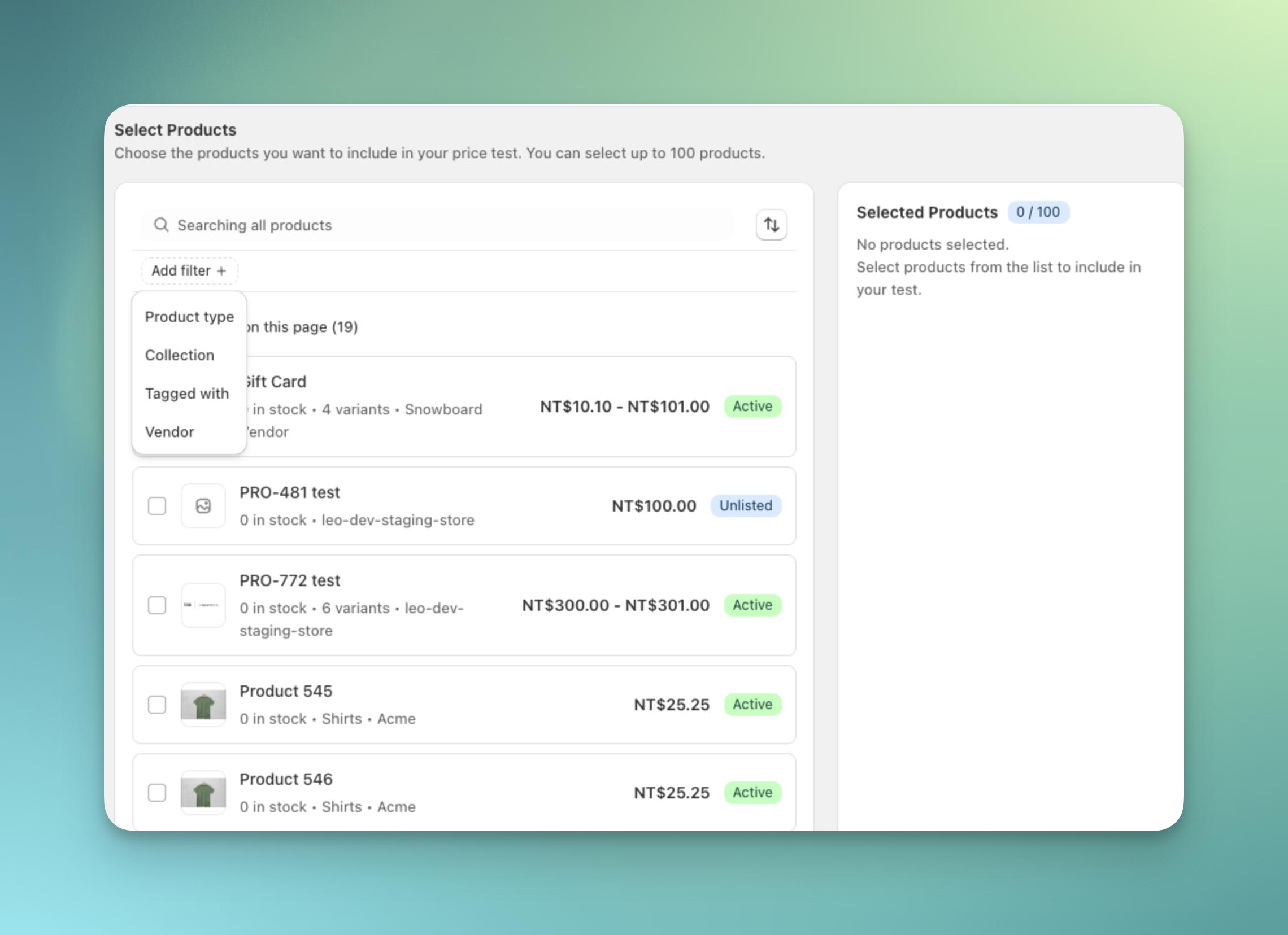
5
Configure pricing for each variant
Enter the prices you want to test for each variant directly in the pricing table. You can manually edit prices, use quick fill for bulk updates, or add additional markets for multi-currency pricing.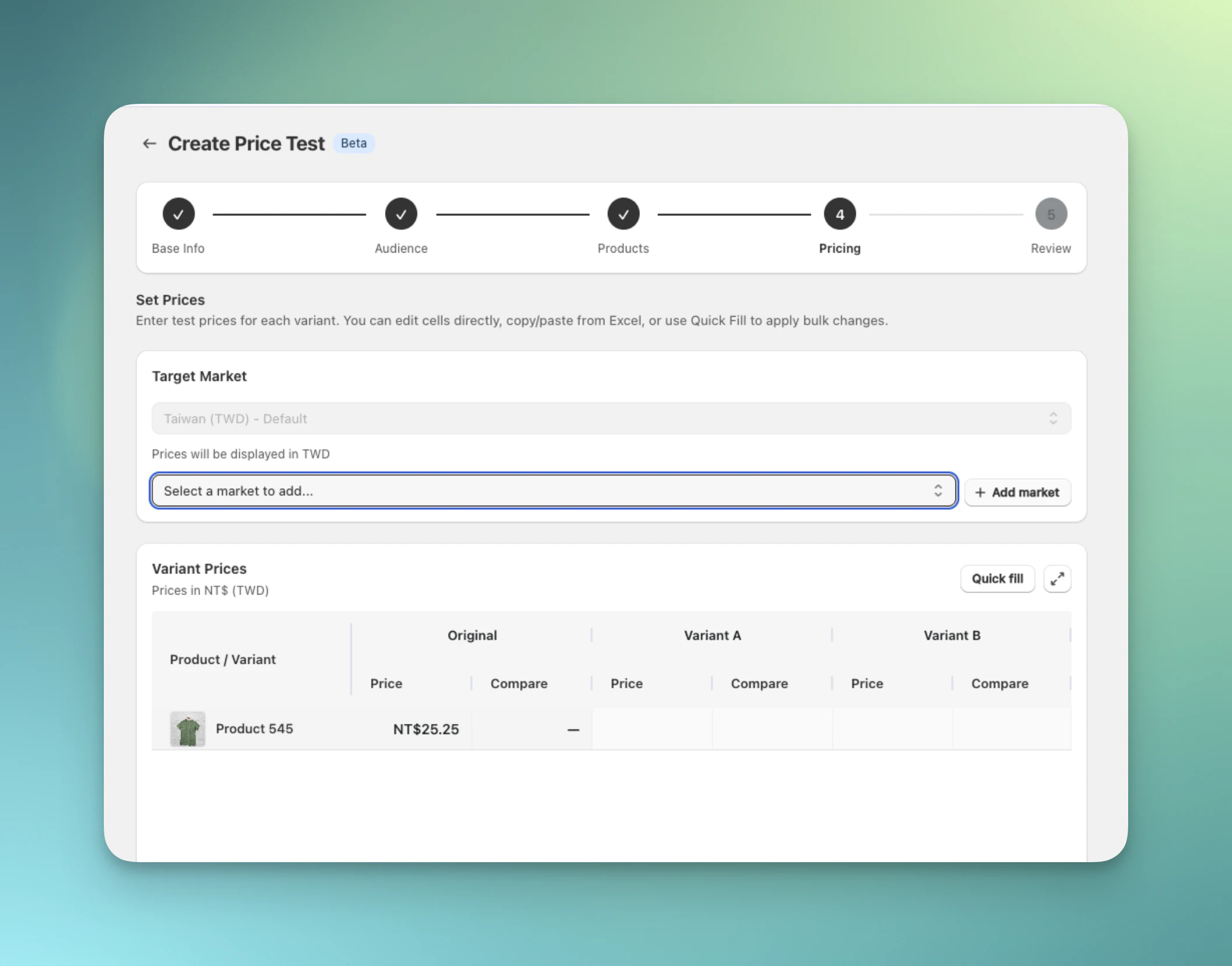
Multi-market price testing is available on the Scale plan and above.
6
Review and launch
Review your full test configuration, including the visitor flow and pricing setup. We recommend using Preview test to check your prices on the storefront before launching. When everything looks correct, click Launch test.
Analyze results by product
On the Analytics dashboard, open the Product tab in Breakdown to see how each product and product variant performed in each test group. No filter is needed. See Product breakdown. Every price test also gets a product group containing its tested products. Open Filters and select the group marked In this test to count only those products in the dashboard totals.Common mistakes
- Skipping Preview test. Preview each test group on the storefront, cart, and checkout before launch so price display matches the price applied at checkout.
- Treating conversion rate as the only win condition. A lower price can lift conversion while lowering profit. Compare conversion rate, average order value, and profit before choosing a winner.
- Setting up your first price test on launch day. First-time price tests may need a theme review before launch, and reviews typically take 1-2 business days. Set up the test and request review earlier so launch day is not blocked.
Price test FAQs
Will visitors see the price change if they refresh the page?
Will visitors see the price change if they refresh the page?
No. ABConvert uses sticky bucketing stored locally in the visitor’s browser. Once a visitor is assigned to a test group, they continue to see the same price for the duration of the test.
How do I test prices safely before launching?
How do I test prices safely before launching?
You can use Preview test to navigate your store as if you were assigned to a specific test group. This allows you to confirm prices display correctly across your product pages, cart, and checkout before visitors see them.
Will price testing break my third-party apps?
Will price testing break my third-party apps?
Our team reviews your theme during the theme review process and will let you know if we identify any compatibility issues before launch. Because ABConvert uses Shopify Functions and keeps your original product variants intact, price testing is compatible with most third-party apps, inventory management systems, and page builders.
Can I run price tests while using Google Ads or Meta Ads?
Can I run price tests while using Google Ads or Meta Ads?
Running price tests while sending traffic from Google Ads or Meta Ads can sometimes cause price mismatch warnings if ad crawlers detect a different storefront price than the price shown in the ad. We recommend either excluding test products from your ad feeds or always routing ad traffic to Control.
Do price tests support subscription products?
Do price tests support subscription products?
No. ABConvert price tests are not compatible with subscription products.
Can I update products or pricing after launching the test?
Can I update products or pricing after launching the test?
No. You cannot update products or pricing after launching the test. Make sure all settings are correct before you launch.
Are price tests compatible with Shopify discounts?
Are price tests compatible with Shopify discounts?
For stores on Shopify Plus, there is no problem at all. Your price tests can run alongside your native Shopify discounts as well as third-party apps that utilize Shopify discounts under the hood.If you are NOT on Shopify Plus, automatic discounts do not apply to test product variants during price tests due to Shopify’s limited cart transform API support on these plans. We suggest avoiding running a price test while also having a discount on the tested product in this case.
Why is the cart behaving unexpectedly during a price test?
Why is the cart behaving unexpectedly during a price test?
If your store is NOT on Shopify Plus and you are seeing the quantity control behaving unexpectedly in your side cart or cart page while running a price test, this is caused by Shopify’s limited cart transform API support on non-Plus plans.On Shopify Plus stores, this behavior does not occur. We recommend reviewing the complete customer journey in Preview Test before going live.