A test can be useful even when it has not reached 95% Confidence. On the default whole-test Analytics view, ABConvert may show one of three checkpoint verdicts once the test has run for at least two weeks without a statistically significant result. The two-week checkpoint applies regardless of your planned end date. For ended tests, ABConvert uses the time the test actually ran. Each compared test group still needs at least 100 visitors and 100 primary events. The decision combines the available data and what the 95% uplift ranges still allow. The acceptable-loss limit is a 5% drop on the primary metric and the evaluated secondary metrics. The checkpoint does not change the statistics in the Performance table.

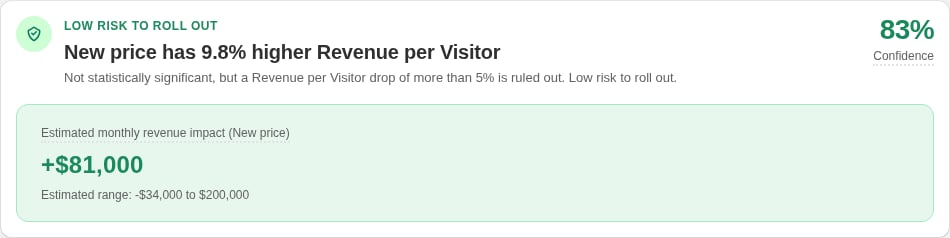
Rollout and monitor

Analytics verdict card showing Confidence and estimated monthly revenue impact

A Rollout and monitor checkpoint verdict

Rollout and monitor means the primary result is not statistically significant and its estimate is at least as high as Control. The primary metric and every evaluated secondary metric have a 95% uplift range that rules out a drop of more than 5%. This verdict does not include Check segment performance. The secondary check uses up to three eligible built-in metrics in your saved metric-card order, or the default order when no cards are saved. Custom metrics are excluded. Profit per Visitor is included only when COGS are configured. A missing range for an evaluated secondary metric prevents Rollout and monitor. Before rollout, check guardrails, implementation cost, brand risk, support load, and operational effort. Roll back if live performance moves outside your acceptable range.

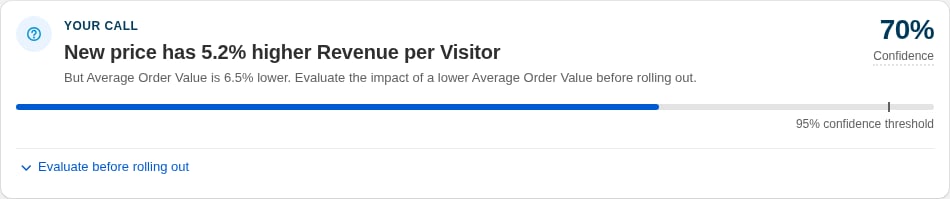
Need your review

Analytics verdict card showing Need your review, Confidence, and a lower secondary metric with the secondary metric review

A Need your review checkpoint verdict

Need your review means the primary metric passes the checkpoint’s loss limit and at least one secondary metric’s 95% uplift range allows a drop of more than 5%. Open Review secondary metrics to compare the uplift estimates and full 95% uplift ranges in metric card order. Check that the possible impact on these metrics will not hurt your profit.

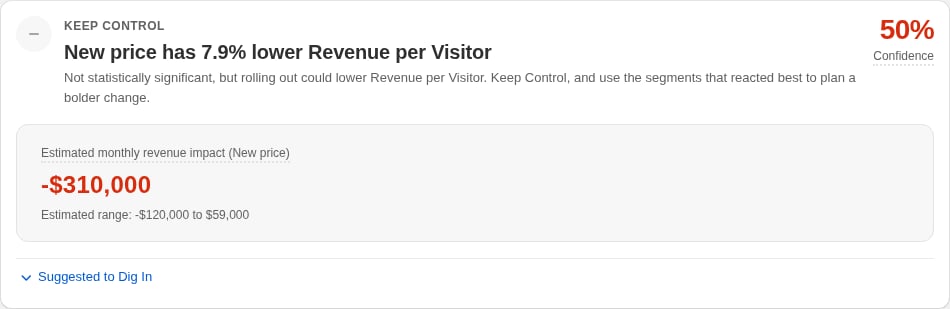
Keep Control

Analytics verdict card showing Keep Control because the primary metric points down

A Keep Control checkpoint verdict

Keep Control means either the primary metric points down or the measured range still allows too much downside. Keep Control rather than treating the uncertain result as a win. When Check segment performance is available, use the segments that reacted best to plan a stronger follow-up test. If no segment scan is available, the card does not show the segment suggestion or disclosure.

Read segment suggestions

When available under Keep Control, Check segment performance lists up to three segments where the selected test group performed better. It is idea discovery, not proof of a segment winner. Eligible segments have at least 25 primary events in each compared test group and appear in uplift order. The table shows each test group’s metric value and visitor count, plus the uplift and its full 95% range. Changing the primary metric recalculates these suggestions; results for the previous metric are hidden until matching results are available. ABConvert records the multiple-comparison check, but passing that check is not required for a row to appear. Use a row to form a new hypothesis, then validate it in a new pre-planned test. Do not roll out to a segment based only on this table.

Before you act

  • Confirm the default whole-test view is selected.
  • Check that the primary metric matches the goal chosen before the test.
  • Review guardrails and the complete uplift range.
  • Make sure Health does not show a blocking data-quality problem.
  • Prefer reversible rollouts and monitor live performance.
For the statistical concepts behind these verdicts, see Statistical significance. For the broader decision process, see How to interpret Analytics results.