> ## Documentation Index
> Fetch the complete documentation index at: https://docs.abconvert.io/llms.txt
> Use this file to discover all available pages before exploring further.
# Page Targeting
> Choose which pages a template or visual editor test runs on.
Page targeting limits a template test or a visual editor test to the pages you choose. Only those pages show the change, and a visitor enters the test only when they open one of them.
Only template tests and visual editor tests have page targeting. Every other test type runs on every page. For *who* enters, see [Audience targeting](/targeting/audience-targeting).
## When to use it
* Test a new template on one product.
* Apply a visual editor change, such as CSS, JavaScript, or new content, to every collection page.
* Run a collection page test everywhere except gift cards.
## When NOT to use it
* **You want to limit who enters, not where.** Use [audience targeting](/targeting/audience-targeting).
* **The test is not a template or visual editor test.** Every other test type runs on every page.
## How it works
1. A new visitor opens a page. If the page does not match the rules, ABConvert decides nothing. The visitor sees the original store.
2. On the first matching page, ABConvert runs the rest of the [targeting flow](/targeting/overview#how-it-works) and assigns the visitor to a test group.
3. From then on, the visitor keeps their test group on every page. Changes show on matching pages. Other pages show the original store.
4. Once a visitor is in the test, everything they do counts toward the results, on every page. Only the change itself is limited to matching pages.
 ## How include and exclude rules combine
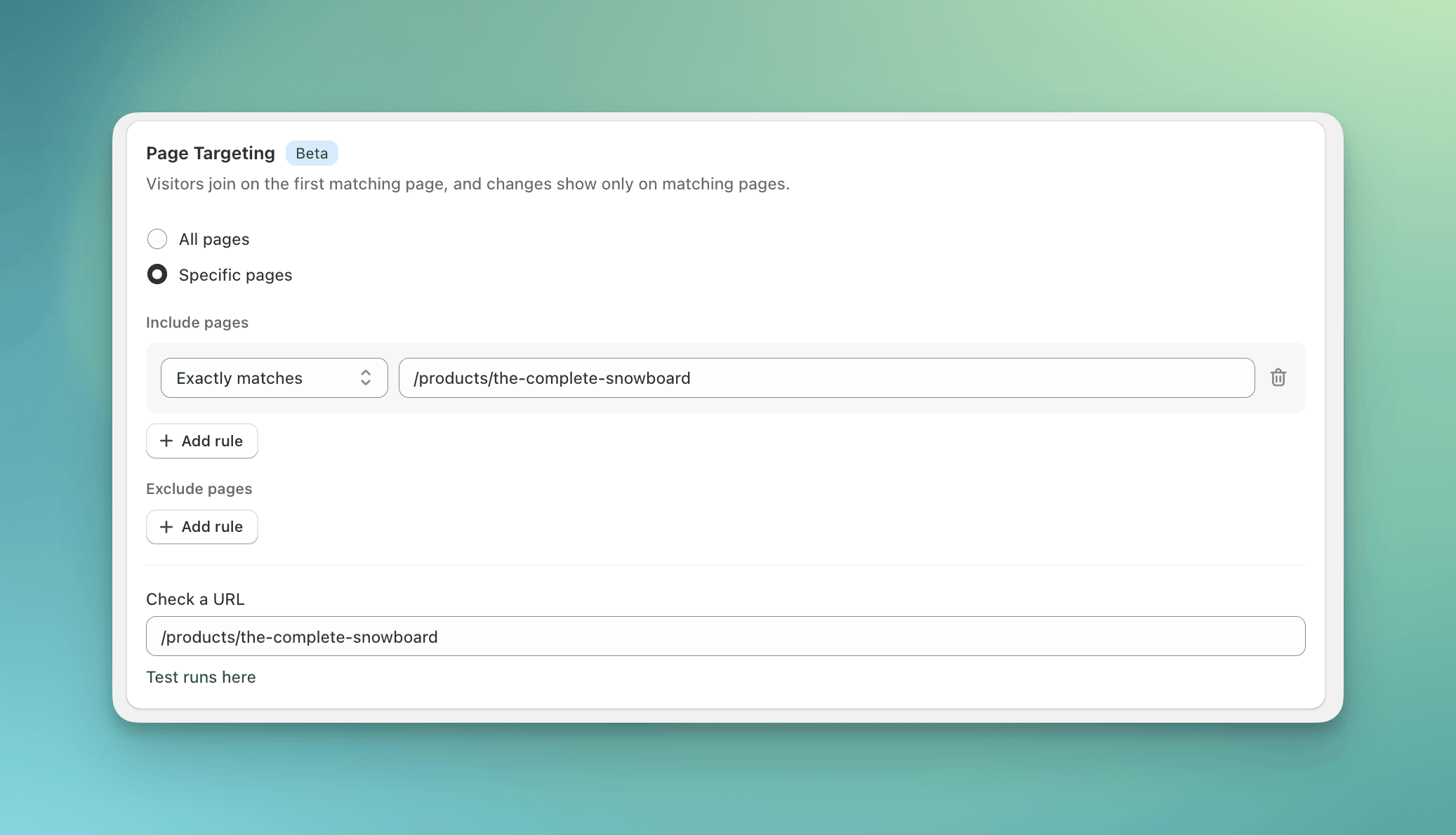
* **Include pages** rules choose pages. A page matches if it matches **any** include rule.
* **Exclude pages** rules remove pages. A page that matches **any** exclude rule is out, even if an include rule matches it.
* No include rules means every page, minus any exclude rules.
## Operators
Each rule has an operator and a value.
| Operator | Compares against | Example value |
| ------------------- | ---------------------------------------- | -------------------------------- |
| **Exactly matches** | The path | `/products/blue-snowboard` |
| **Starts with** | The path | `/collections/` |
| **Contains** | The full URL, including the query string | `variant=` |
| **Matches regex** | The full URL | `/collections/(sale\|clearance)` |
Matching is case-sensitive, and a trailing slash matters.
Which URLs match which rule:
| URL | Exactly matches `/collections/sale` | Starts with `/collections/` | Contains `sale` |
| ------------------------------ | ----------------------------------- | --------------------------- | --------------- |
| `/collections/sale` | Yes | Yes | Yes |
| `/collections/sale?sort=price` | Yes | Yes | Yes |
| `/collections/sale/` | No | Yes | Yes |
| `/collections/summer-sale` | No | Yes | Yes |
| `/products/sale-hat` | No | No | Yes |
## Check a URL
Type any path or URL into **Check a URL** at the bottom of the Page Targeting card to see whether the test runs there. Use it before you launch.
## In the visual editor
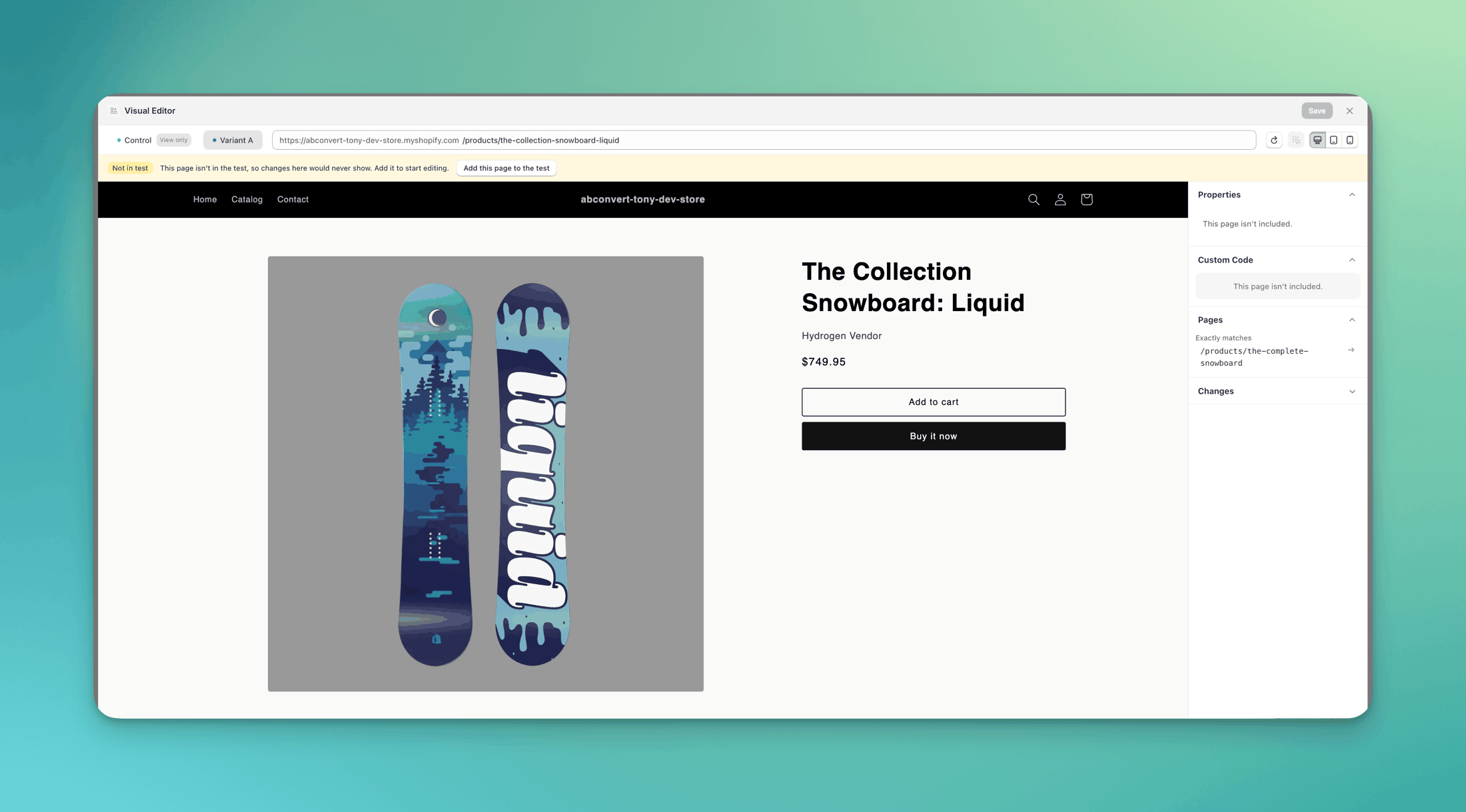
You can only edit pages the rules cover. If you open a page outside them, the editor tells you and offers to add the page to the test with one click.
## How include and exclude rules combine
* **Include pages** rules choose pages. A page matches if it matches **any** include rule.
* **Exclude pages** rules remove pages. A page that matches **any** exclude rule is out, even if an include rule matches it.
* No include rules means every page, minus any exclude rules.
## Operators
Each rule has an operator and a value.
| Operator | Compares against | Example value |
| ------------------- | ---------------------------------------- | -------------------------------- |
| **Exactly matches** | The path | `/products/blue-snowboard` |
| **Starts with** | The path | `/collections/` |
| **Contains** | The full URL, including the query string | `variant=` |
| **Matches regex** | The full URL | `/collections/(sale\|clearance)` |
Matching is case-sensitive, and a trailing slash matters.
Which URLs match which rule:
| URL | Exactly matches `/collections/sale` | Starts with `/collections/` | Contains `sale` |
| ------------------------------ | ----------------------------------- | --------------------------- | --------------- |
| `/collections/sale` | Yes | Yes | Yes |
| `/collections/sale?sort=price` | Yes | Yes | Yes |
| `/collections/sale/` | No | Yes | Yes |
| `/collections/summer-sale` | No | Yes | Yes |
| `/products/sale-hat` | No | No | Yes |
## Check a URL
Type any path or URL into **Check a URL** at the bottom of the Page Targeting card to see whether the test runs there. Use it before you launch.
## In the visual editor
You can only edit pages the rules cover. If you open a page outside them, the editor tells you and offers to add the page to the test with one click.
 ## Rollouts
When you roll out a winning test group as a [personalization](/personalization/overview), the personalization keeps the test's page targeting. You cannot change it on the personalization.
## Common mistakes
* **Forgetting the trailing slash.** `/collections/sale/` does not exactly match `/collections/sale`. Use **Starts with**, or add both.
* **Using Contains for a path.** **Contains** looks at the whole URL, so `sale` also matches `/products/sale-hat`. Use **Starts with** for a section of the store.
* **Adding an exclude rule that covers everything.** Exclude **Contains** `/` removes every page.
* **Editing a page the rules do not cover.** The visual editor locks it. Add the page, or change the rule, before you edit.
## FAQ
No. Page targeting is locked once the test starts. End the test and duplicate it with the new targeting.
The original home page. They keep their test group, and the change shows again on the next matching page they open.
Not yet. A combined test runs on every page.
A visitor only joins when they open a matching page and match every condition in [audience targeting](/targeting/audience-targeting). A visitor who only opens the home page is never assigned.
## Rollouts
When you roll out a winning test group as a [personalization](/personalization/overview), the personalization keeps the test's page targeting. You cannot change it on the personalization.
## Common mistakes
* **Forgetting the trailing slash.** `/collections/sale/` does not exactly match `/collections/sale`. Use **Starts with**, or add both.
* **Using Contains for a path.** **Contains** looks at the whole URL, so `sale` also matches `/products/sale-hat`. Use **Starts with** for a section of the store.
* **Adding an exclude rule that covers everything.** Exclude **Contains** `/` removes every page.
* **Editing a page the rules do not cover.** The visual editor locks it. Add the page, or change the rule, before you edit.
## FAQ
No. Page targeting is locked once the test starts. End the test and duplicate it with the new targeting.
The original home page. They keep their test group, and the change shows again on the next matching page they open.
Not yet. A combined test runs on every page.
A visitor only joins when they open a matching page and match every condition in [audience targeting](/targeting/audience-targeting). A visitor who only opens the home page is never assigned.