> ## Documentation Index
> Fetch the complete documentation index at: https://docs.abconvert.io/llms.txt
> Use this file to discover all available pages before exploring further.
# URL Redirect Test: Getting Started
> A/B test different landing pages to identify the page design that drives the highest conversion rate.
## What is a URL redirect test?
A URL redirect test automatically sends a percentage of your visitors to an alternative URL when they land on your original page. This is the most flexible test type for comparing major structural changes or completely different landing page designs.
## URL redirect test use cases
* **Test entirely new landing pages:** Compare a long-form sales page against a short, feature-focused landing page.
* **Test promotional offers:** Send visitors to different pages featuring unique discounts or bundles to see which offer drives the highest revenue.
* **Test localized content:** Redirect visitors to different subfolders (e.g., `/products/item` vs `/uk/products/item`) to test region-specific messaging.
## Set up a URL redirect test
In the ABConvert dashboard, click **Create New Test** and select **URL Redirect Test**.
Enter a descriptive name for your experiment, write a clear hypothesis, and select your primary success metric. By default, traffic is split evenly between the Control and Variant groups. You can adjust the traffic allocation or add additional variants.
Define which visitors should enter the experiment using audience targeting and traffic allocation rules. Read more in the [Audience targeting](/experiments/audience-targeting) guide.
Define the starting page for the experiment and where each visitor group will be redirected.
* **Control:** stays on the original page
* **Variant(s):** redirected to the specified destination
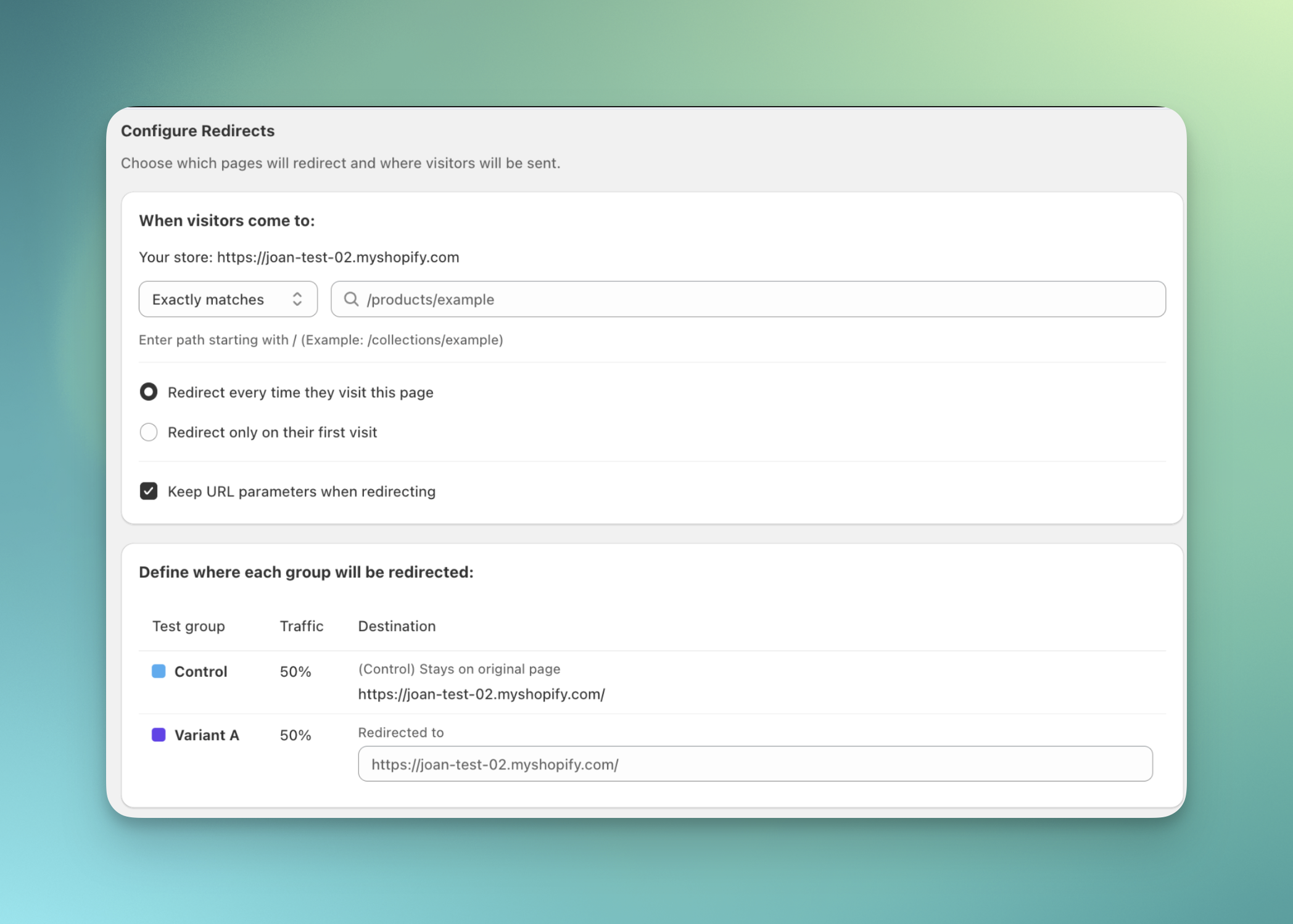 ABConvert **automatically suggests** pages from your store as you type. You can also use the matching options below to control how URLs are matched:
* **Exactly matches**: Only triggers on the exact URL
* **Starts with**: Triggers if the URL starts with the pattern
* **Contains**: Triggers if the URL contains the pattern
Review your full experiment configuration, including the visitor flow and redirect settings. We recommend using **Preview test** to check that the redirect is working as expected before launching. When everything looks correct, click **Launch test**.
## URL redirect test FAQs
The short answer is: URL Redirect Tests will **NOT** violate ads policy as long as you meet the platform’s requirements. In this question, we will go through the current ads policy and address potential concerns (Nov 1, 2024).
**Google Ads Policy**
Google’s [Destination requirements](https://support.google.com/adspolicy/answer/6368661?sjid=5642879325978226616-NA#672) mentions a principle called “Destination Mismatch“. You might be concerned with violating this specific ads policy when choosing to run an URL Redirect test. This will NOT be the case as long as the [display URL](https://support.google.com/google-ads/answer/2616010?sjid=12299956676139922965-NA) on your ads is the same as the final URL. Therefore, make sure you are **using the same domain in your ads and the redirected URL** to meet this requirement.
Refer to Google’s example for more details:
Display URLs give people an idea of where they'll arrive after they click an ad. The landing page that you define with a final URL tends to be more specific. For example, if your display URL is [www.example.com](http://www.example.com), your final URL might be example.com/sweaters.
**Facebook Ads Policy**
In Facebook’s “[About Meta’s Unacceptable Business Practices advertising policy](https://www.facebook.com/business/help/2895682587380674?id=434838534925385)”, it is only mentioned that your ad’s landing page should be functioning properly and the content is relevant to your ad. Therefore, URL Redirect Tests will **NOT** cause a problem with your Facebook ads. While Facebook does not have a clear requirement for URL destination, refer to [About destination links in your ad](https://www.facebook.com/business/help/152143699744690) to learn more about Facebook’s definitions:
The display URL allows you to show a shortened link instead of your full website URL to make it easier for viewers to recognize the website. The link goes to the same domain as your website URL.
According to the above, you can also double check if you have the same display URL on your ad as the final URL to be on the safe side.
No. ABConvert URL redirect tests only work within your primary Shopify store domain. Redirecting to external domains or subdomains (e.g., `mystore.uk.shopify.com`) is not supported because we cannot track sessions or conversions across domains. If you want to test localized pages, use subfolders (e.g., `mystore.com/uk/`) instead.
The most common reason a URL redirect test fails to trigger is an incorrect trigger condition setup. If you are targeting a specific page, make sure to use "**Exactly matches**" instead of "Contains".
## Attribution and ad tracking
A redirect test changes the URL a visitor lands on, so a common worry is whether it breaks paid ad attribution. It does not, because the redirect keeps your ad tracking parameters intact.
No. The redirect keeps your full query string, so the tracking parameters on the original ad link reach the destination page.
Google Ads attributes a click from the URL, not from the referring site. Auto-tagging adds a [Google Click Identifier (`gclid`) to the ad URL, which maps the ad click to a row in your report](https://developers.google.com/google-ads/api/docs/reporting/valuetrack-mapping). GA4 captures the full page URL, which [defaults to `document.location`](https://developers.google.com/analytics/devguides/collection/ga4/reference/config) and so includes the `gclid` along with any `utm_` campaign tags. Because the redirect preserves the query string, those values arrive on the destination page intact, so the ad click stays tied to your campaign.
All of them. The redirect carries over your existing query string, including `utm_source`, `utm_medium`, `utm_campaign`, the Google Ads click ID (`gclid`) and its `gbraid`/`wbraid` variants, and the Facebook click ID (`fbclid`). It only appends ABConvert's own markers on top, so nothing is stripped from the destination URL that your analytics and ad tools read.
ABConvert **automatically suggests** pages from your store as you type. You can also use the matching options below to control how URLs are matched:
* **Exactly matches**: Only triggers on the exact URL
* **Starts with**: Triggers if the URL starts with the pattern
* **Contains**: Triggers if the URL contains the pattern
Review your full experiment configuration, including the visitor flow and redirect settings. We recommend using **Preview test** to check that the redirect is working as expected before launching. When everything looks correct, click **Launch test**.
## URL redirect test FAQs
The short answer is: URL Redirect Tests will **NOT** violate ads policy as long as you meet the platform’s requirements. In this question, we will go through the current ads policy and address potential concerns (Nov 1, 2024).
**Google Ads Policy**
Google’s [Destination requirements](https://support.google.com/adspolicy/answer/6368661?sjid=5642879325978226616-NA#672) mentions a principle called “Destination Mismatch“. You might be concerned with violating this specific ads policy when choosing to run an URL Redirect test. This will NOT be the case as long as the [display URL](https://support.google.com/google-ads/answer/2616010?sjid=12299956676139922965-NA) on your ads is the same as the final URL. Therefore, make sure you are **using the same domain in your ads and the redirected URL** to meet this requirement.
Refer to Google’s example for more details:
Display URLs give people an idea of where they'll arrive after they click an ad. The landing page that you define with a final URL tends to be more specific. For example, if your display URL is [www.example.com](http://www.example.com), your final URL might be example.com/sweaters.
**Facebook Ads Policy**
In Facebook’s “[About Meta’s Unacceptable Business Practices advertising policy](https://www.facebook.com/business/help/2895682587380674?id=434838534925385)”, it is only mentioned that your ad’s landing page should be functioning properly and the content is relevant to your ad. Therefore, URL Redirect Tests will **NOT** cause a problem with your Facebook ads. While Facebook does not have a clear requirement for URL destination, refer to [About destination links in your ad](https://www.facebook.com/business/help/152143699744690) to learn more about Facebook’s definitions:
The display URL allows you to show a shortened link instead of your full website URL to make it easier for viewers to recognize the website. The link goes to the same domain as your website URL.
According to the above, you can also double check if you have the same display URL on your ad as the final URL to be on the safe side.
No. ABConvert URL redirect tests only work within your primary Shopify store domain. Redirecting to external domains or subdomains (e.g., `mystore.uk.shopify.com`) is not supported because we cannot track sessions or conversions across domains. If you want to test localized pages, use subfolders (e.g., `mystore.com/uk/`) instead.
The most common reason a URL redirect test fails to trigger is an incorrect trigger condition setup. If you are targeting a specific page, make sure to use "**Exactly matches**" instead of "Contains".
## Attribution and ad tracking
A redirect test changes the URL a visitor lands on, so a common worry is whether it breaks paid ad attribution. It does not, because the redirect keeps your ad tracking parameters intact.
No. The redirect keeps your full query string, so the tracking parameters on the original ad link reach the destination page.
Google Ads attributes a click from the URL, not from the referring site. Auto-tagging adds a [Google Click Identifier (`gclid`) to the ad URL, which maps the ad click to a row in your report](https://developers.google.com/google-ads/api/docs/reporting/valuetrack-mapping). GA4 captures the full page URL, which [defaults to `document.location`](https://developers.google.com/analytics/devguides/collection/ga4/reference/config) and so includes the `gclid` along with any `utm_` campaign tags. Because the redirect preserves the query string, those values arrive on the destination page intact, so the ad click stays tied to your campaign.
All of them. The redirect carries over your existing query string, including `utm_source`, `utm_medium`, `utm_campaign`, the Google Ads click ID (`gclid`) and its `gbraid`/`wbraid` variants, and the Facebook click ID (`fbclid`). It only appends ABConvert's own markers on top, so nothing is stripped from the destination URL that your analytics and ad tools read.