> ## Documentation Index
> Fetch the complete documentation index at: https://docs.abconvert.io/llms.txt
> Use this file to discover all available pages before exploring further.
# Engagement Metrics: Measure How a Variant Affects a Page
> Understand whether a variant makes a page or template more engaging: how often visitors click through, how often they bounce, and how long they actively stay.
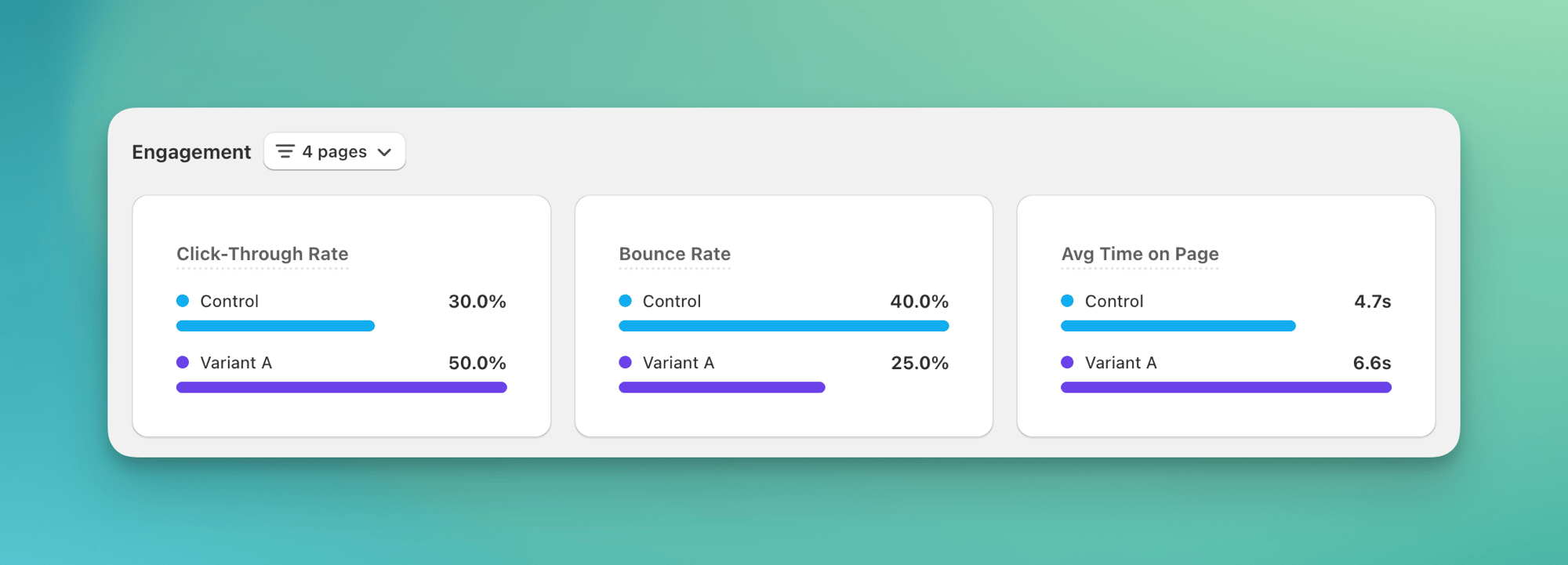
Engagement metrics show whether a variant keeps visitors interested. You see it in days, long before you have enough sales to call a winner. An engaging page is one where the visitor clicks through to another page, doesn't bounce, and stays longer. ABConvert measures this on the pages your test changed, so it complements your [traffic and conversion metrics](/analytics/metrics), which cover the whole funnel.
## When to use it
* **Landing-page redirect tests.** Run a [URL redirect test](/experiments/url-redirect-test) between two landing pages and see which one keeps visitors clicking through instead of bouncing.
* **Template and theme tests.** When a [template test](/experiments/template-test) changes a product or collection layout, check whether the new layout earns more scroll, more clicks, and longer active time.
* **Visual editor changes.** After a [visual editor test](/experiments/visual-editor-test) rearranges a page, confirm the change helped engagement on exactly the pages it touched.
* **Guarding against side effects.** When a price test changes what shoppers see, check that browsing engagement on the tested product pages didn't drop.
## When NOT to use it
* **Measuring revenue or conversion lift.** Engagement tells you whether visitors stayed and clicked, not whether they bought. Use [traffic and conversion metrics](/analytics/metrics) instead.
* **Reconciling against GA4.** These are measured per page and won't line up with GA4's session numbers. See the FAQ for why.
* **Tests with no page or template target.** Shipping, payment, and checkout tests don't change a specific page, so an engagement number for the whole store mixes the test in with everything else and tells you nothing. Judge those on conversion and revenue instead.
## The three metrics
Each metric is measured per page view, then totaled for the page or template in scope.
| Metric | What it means |
| ------------------ | ------------------------------------------------------------------------------------------------------------------------------------------------------------------------- |
| Click-Through Rate | How often visitors click through to another page on your store, as a share of page views. Higher is usually better. |
| Bounce Rate | Share of page views with no engagement. A view counts as engaged if the visitor scrolled, clicked through, or stayed active for over 10 seconds. Lower is usually better. |
| Avg Time on Page | Average active time visitors spend on the page, not counting time the tab sits in the background. Longer usually means more interest. |
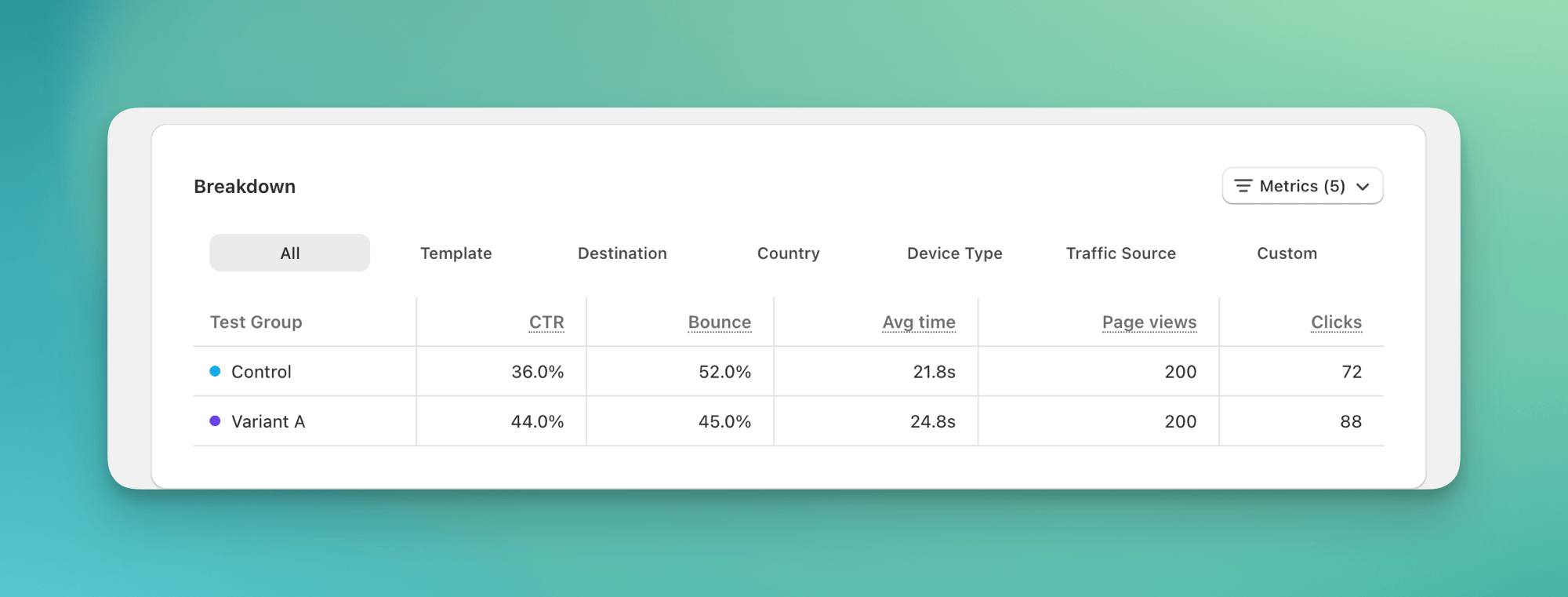
The breakdown table also shows two supporting counts:
* **Page views** are how many times visitors in this test loaded a page inside the scope you picked. The three rates above are all measured out of this number, so a small page-view count means the rates are still noisy.
* **Clicks** are how many times visitors clicked through to another page on your store.
**Example.** Your redirect test sends visitors to Landing B. Control bounces 62%, Variant B bounces 48%, and Variant B also lifts click-through from 22% to 31% and keeps visitors longer on average: three signals pointing the same way. Click the **Destination** tab to see where click-throughs went.
## How scope works
Scope is the set of pages you want this test judged on. It matters because if you measure the whole store, the few pages your test changed get drowned out by all the pages it didn't, and a real improvement can vanish into the average.
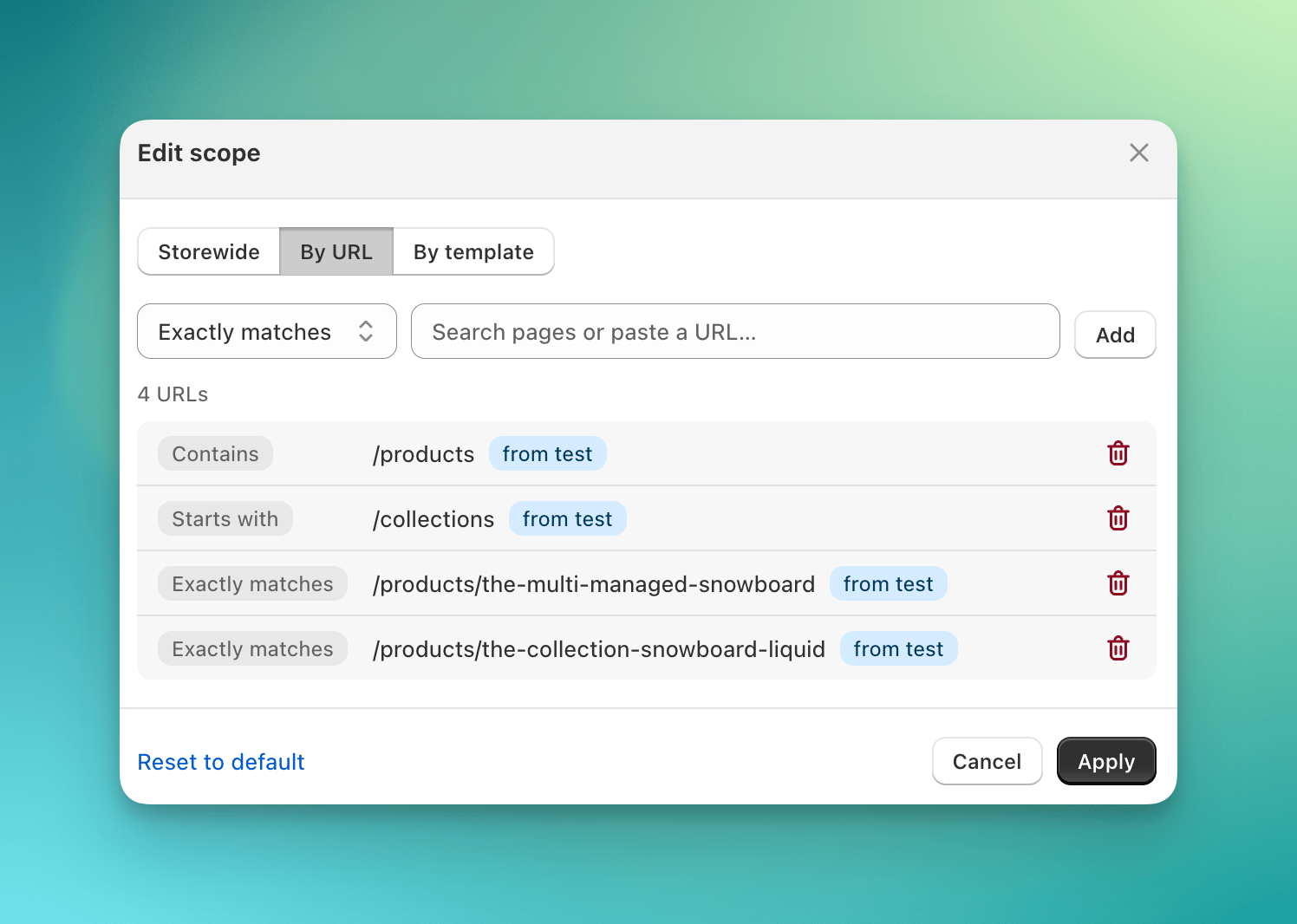
The scope button reads **Storewide**, or a count like **3 pages** or **2 templates**. Click it to view the pages in scope, or to open the **Edit scope** modal. (A template is the shared layout behind a group of pages, like the layout every product page uses.)
Try it: open a redirect test's Engagement section and click the scope button.
 ### Default scope per test type
When a test launches, ABConvert seeds a default scope from what the test actually changes, so engagement points at the right pages from day one.
| Test type | Default scope |
| ----------------------------------------------------- | ------------------------------------------------------------------------------ |
| [Price test](/experiments/price-test) | The tested products' product pages (`/products/{handle}`, exact match) |
| [URL redirect test](/experiments/url-redirect-test) | Each rule's trigger and destination URLs, using that rule's own match type |
| [Template test](/experiments/template-test) | The templates assigned to control and variants, matched as templates |
| [Visual editor test](/experiments/visual-editor-test) | The page URLs each modification targets, matched as a pattern (glob supported) |
| Shipping, offer, theme, checkout tests | Storewide (these don't target specific pages) |
For the storewide-by-default types you can still narrow scope by hand. A **Reset to default** action restores the launch-derived default at any time.
### Edit the scope
Open the **Edit scope** modal and pick a mode:
* **Storewide** measures every page.
* **By URL** takes one or more URL rules. Each rule has a match type: **Exactly matches**, **Starts with**, or **Contains**. (Visual editor tests, which support glob URLs, also offer **Matches pattern**.)
* **By template** lets you pick templates, so engagement rolls up by template instead of by URL.
Rules seeded from the test's launch default are tagged **from test**, so you can tell them from ones you added by hand.
### Default scope per test type
When a test launches, ABConvert seeds a default scope from what the test actually changes, so engagement points at the right pages from day one.
| Test type | Default scope |
| ----------------------------------------------------- | ------------------------------------------------------------------------------ |
| [Price test](/experiments/price-test) | The tested products' product pages (`/products/{handle}`, exact match) |
| [URL redirect test](/experiments/url-redirect-test) | Each rule's trigger and destination URLs, using that rule's own match type |
| [Template test](/experiments/template-test) | The templates assigned to control and variants, matched as templates |
| [Visual editor test](/experiments/visual-editor-test) | The page URLs each modification targets, matched as a pattern (glob supported) |
| Shipping, offer, theme, checkout tests | Storewide (these don't target specific pages) |
For the storewide-by-default types you can still narrow scope by hand. A **Reset to default** action restores the launch-derived default at any time.
### Edit the scope
Open the **Edit scope** modal and pick a mode:
* **Storewide** measures every page.
* **By URL** takes one or more URL rules. Each rule has a match type: **Exactly matches**, **Starts with**, or **Contains**. (Visual editor tests, which support glob URLs, also offer **Matches pattern**.)
* **By template** lets you pick templates, so engagement rolls up by template instead of by URL.
Rules seeded from the test's launch default are tagged **from test**, so you can tell them from ones you added by hand.
 ### Break engagement down
Breakdown tabs read the metrics across a dimension:
* **All** totals the whole scope.
* **Page** lists one row per URL (URL scope only).
* **Template** lists one row per template (template scope only).
* **Destination** shows where click-throughs went (available whenever your scope is narrower than the whole store).
* **Country**, **Device Type**, and **Traffic Source** split by audience.
* **Custom** combines two dimensions, for example page by destination.
### Break engagement down
Breakdown tabs read the metrics across a dimension:
* **All** totals the whole scope.
* **Page** lists one row per URL (URL scope only).
* **Template** lists one row per template (template scope only).
* **Destination** shows where click-throughs went (available whenever your scope is narrower than the whole store).
* **Country**, **Device Type**, and **Traffic Source** split by audience.
* **Custom** combines two dimensions, for example page by destination.
 A click-through counts whenever a visitor moves to another page on your store, by a link, a button, or submitting a form, not just tracked link clicks. Going to another website doesn't count.
## Common mistakes
* **Benchmarking against GA4.** GA4 measures engagement per session with proxies; ABConvert measures it per page directly. The numbers are built differently and won't match. Compare variant against control inside ABConvert.
* **Leaving scope at Storewide on a redirect or template test.** A few changed pages get diluted by every untouched page, and the lift disappears. Use the launch-derived default, or scope by URL or template to the pages the test changes.
* **Expecting data for anonymous visitors.** Engagement is only collected after a visitor is assigned to a test, so unassigned traffic never appears.
* **Comparing Click-Through Rate across different scopes.** A rate measured over product pages and a rate measured storewide aren't the same denominator. Keep the scope fixed when you compare.
## FAQ
A visitor moving to another page on your store, by a link, a button, or submitting a form, not just tracked link clicks. Going to another website doesn't count.
When the visitor scrolled, clicked through, or stayed active for over 10 seconds. A view with none of those counts as a bounce.
Click-Through Rate is onward navigations divided by page views. Bounce Rate is 1 minus engaged page views divided by page views. Avg Time on Page is the average active (foreground) time per page view, including the last page a visitor saw.
No. It counts only active, in-focus time. Time the tab sits in the background is excluded. The exit page is included in the average.
They are not meant to. ABConvert measures engagement per page at page grain; GA4 measures it per session with proxies. Use ABConvert's numbers to compare variant against control, not to reconcile with GA4. See [GA4 integration](/configuration/ga4-integration).
ABConvert seeds it from what the test changes at launch. Edit it any time; **Reset to default** restores the seeded scope. See [How scope works](#how-scope-works).
Yes. In the Edit scope modal choose **By template** and pick your templates. The breakdown then shows a **Template** tab with one row per template.
With a non-storewide scope, open the **Destination** breakdown tab. It lists where click-throughs went, so you can read flows like homepage to a specific product page.
For how to read whether a difference is real rather than noise, see [statistical significance](/analytics/statistical-significance) and the [Analytics overview](/analytics/overview).
A click-through counts whenever a visitor moves to another page on your store, by a link, a button, or submitting a form, not just tracked link clicks. Going to another website doesn't count.
## Common mistakes
* **Benchmarking against GA4.** GA4 measures engagement per session with proxies; ABConvert measures it per page directly. The numbers are built differently and won't match. Compare variant against control inside ABConvert.
* **Leaving scope at Storewide on a redirect or template test.** A few changed pages get diluted by every untouched page, and the lift disappears. Use the launch-derived default, or scope by URL or template to the pages the test changes.
* **Expecting data for anonymous visitors.** Engagement is only collected after a visitor is assigned to a test, so unassigned traffic never appears.
* **Comparing Click-Through Rate across different scopes.** A rate measured over product pages and a rate measured storewide aren't the same denominator. Keep the scope fixed when you compare.
## FAQ
A visitor moving to another page on your store, by a link, a button, or submitting a form, not just tracked link clicks. Going to another website doesn't count.
When the visitor scrolled, clicked through, or stayed active for over 10 seconds. A view with none of those counts as a bounce.
Click-Through Rate is onward navigations divided by page views. Bounce Rate is 1 minus engaged page views divided by page views. Avg Time on Page is the average active (foreground) time per page view, including the last page a visitor saw.
No. It counts only active, in-focus time. Time the tab sits in the background is excluded. The exit page is included in the average.
They are not meant to. ABConvert measures engagement per page at page grain; GA4 measures it per session with proxies. Use ABConvert's numbers to compare variant against control, not to reconcile with GA4. See [GA4 integration](/configuration/ga4-integration).
ABConvert seeds it from what the test changes at launch. Edit it any time; **Reset to default** restores the seeded scope. See [How scope works](#how-scope-works).
Yes. In the Edit scope modal choose **By template** and pick your templates. The breakdown then shows a **Template** tab with one row per template.
With a non-storewide scope, open the **Destination** breakdown tab. It lists where click-throughs went, so you can read flows like homepage to a specific product page.
For how to read whether a difference is real rather than noise, see [statistical significance](/analytics/statistical-significance) and the [Analytics overview](/analytics/overview).